


ImTOO Download YouTube Video for Mac

Update: Feb 11, 2023
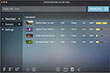
Are you looking for free software to download YouTube Video? Now, ImTOO Download YouTube Video for Mac will be the ideal choice for you. It is a free, high-speed, and flexible application to download YouTube videos like FLV, MP4, Webm, even 3D videos. In addition, it can convert YouTube Video to some popular video formats and play them on all kinds of devices.
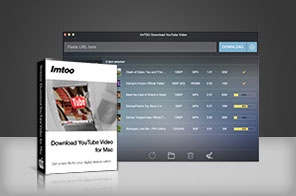


- All YouTube Videos are supported, including HD-format videos (1080p and 4k videos). This YouTube Downloader for Mac is made especially for Mac users! It's FREE!
- Convert YouTube videos to MP3, AVI, MP4, MKV, 3GP, H.264, MPEG, etc.(Paid Function)
- Convert local video files in different formats to other video formats.(Paid Function)
- Convert YouTube videos for viewing on iPhone, iPad, iPod, Galaxy, Apple TV and other devices. (Paid Function)

Main Functions
 FREE YouTube Downloader for Mac!
ImTOO Download YouTube Video for Mac is FREE! Install now and download YouTube videos like MP4, FLV, Webm. Download YouTube HD videos
Download all kinds of YouTube HD videos such as 720p, 1080p and 4k videos. Convert YouTube Videos to other videos
Convert YouTube FLV, MP4 to MP3, AVI, MPEG, MP4, MKV, and other formats. Much Powerful Video Converter
Convert the local videos in different formats, such as AVI, MPEG, WMV, MKV, MP4, H.264/MPEG-4, etc to any other videos.
Key Features
- Support downloading all YouTube videos including FLV, MP4, Webm, even 3D videos.
- Provide the option for you to choose if you want to convert automatically after downloading.
- You can choose to convert YouTube video to all kinds of formats such as MP3, AVI, MPEG, WMV, MP4, FLV, etc.
- Support directly transferring MP4, MOV, MP3 files to iTunes.
- You can set output file to compatible with the devices like iPhone, iPad, Galaxy, and so on.
- Users can customize the conversion settings.
- New and much smarter design brings much easier usage and better user experiences.






User Reviews
"Just downloaded and tried your YouTube downloader for Mac. It's really free. Now I can download all my favorite videos and watch them on my Mac. Thanks."Andrew, US


-
- iTransfer Platinum Mac

- iPhone Transfer Platinum Mac
- iPad Mate Platinum Mac

- PodWorks Platinum Mac
- iPhone Ringtone Maker Mac
- iPhone Transfer Plus Mac
- iPad Mate for Mac
- PodWorks for Mac
- iPhone Contacts Transfer Mac
- DVD to Video for Mac
- DVD to MP4 Converter for Mac
- DVD to iPhone Converter for Mac
- Blu-ray to Video Converter for Mac
- DVD to iPad Converter for Mac
- DVD to Audio Converter for Mac
- DVD Creator for Mac
- Video Converter for Mac
- MP4 Converter for Mac
- 3D Movie Converter Mac
- Video Editor 2 for Mac
- Audio Converter Pro Mac
- YouTube Video Converter for Mac
- Download YouTube Video for Mac
- YouTube HD Video Downloader Mac
- YouTube to iTunes Converter Mac

- YouTube to iPhone Converter Mac
- HEVC/H.265 Converter for Mac
- iTransfer Platinum Mac
- More