


ImTOO iPhone Ringtone Maker

Update: Nov 23, 2023
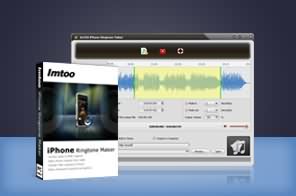




- Make iPhone ringtone (M4R) from audio and video formats (including MP3, WMA, WAV, RA, M4A, AAC, AC3, OGG, AVI, MPEG, WMV, DivX, MP4, H.264/AVC, MKV, RM, and MOV).
- Transfer converted ringtones to iPhone directly without iTunes.
- Supports all iPhone/iPad types.
- Transfer any iPhone ringtone to iTunes (iOS 17 and iTunes 12 is supported now).
- User-friendly interface.
- Trim audio/video segment; create fade-in & fade-out effects; adjust ringtone volume and much more.

Tired of buying iPhone ringtones from iTunes? Well here's your solution. Introducing the ImTOO iPhone Ringtone Maker – a smart iPhone ringtone creator offers an all-in-one iPhone ringtone making and converting solution. Now you can make ringtones for your iPhone from almost all video and audio formats (including AVI, MPEG, WMV, DivX, MP4, H.264/AVC, MKV, RM, MOV, MP3, WMA, WAV, RA, M4A, AAC, AC3, and OGG.), and then transfer them to your iPhone directly.
Download ImTOO iPhone Ringtone Maker for FREE and try out its amazing features for yourself.
iPhone Products Comparison: iPhone Ringtone Maker, iPhone Contacts Transfer, iPhone Photo Transfer, iPhone Transfer, iPhone Transfer Plus, iPhone Transfer Platinum
Main Functions
 Convert Audio to M4R Ringtone
Convert any popular audio format such as WMA, WAV, RA, M4A, AAC, AC3, OGG, or MP3 to M4R, and make it your iPhone ringtone. Make iPhone Ringtone from Video
Convert AVI, MPEG, WMV, DivX, MP4, H.264, MKV, RM, MOV, XviD, or 3GP to M4R ringtone. Transfer Ringtone to iPhone Directly
Directly transfers converted M4R ringtone to your iPhone without iTunes.
What's new
- Fully compatible with iOS 17, iPhone 15, iPhone 15 Plus, iPhone 15 Pro, iPhone 15 Pro Max
- Fully support iOS 6, iTunes 10.7, and iPhone 5
- Added the display of audio waveform for more precise adjustments of start point and end point.
- Improved user experience in ringtone editing to make ringtones for iPhone more handily.
- Enriched ringtone management functions:
- Added the function of appending ringtone files from PC to iPhone directly.
- Added the function of renaming ringtones on iPhone.
- Added the function of exporting ringtones on iPhone to iTunes and PC.
Key Features
- ImTOO iPhone Ringtone Maker can create fade-in and fade-out effects for your ringtone.
- More features than ever before: adjust the ringtone volume; rename the ringtone and more.
- Set the ringtone duration and create it to the millisecond.
- Add files easily and conveniently with drag and drop.
- Trim a video or audio file to retain the desired segment and convert it to M4R iPhone ringtone.
- This ringtone maker fully supports iPhone, iPhone 3G, iPhone 3GS, iPhone 4, iPhone 4S, iPhone 5, iPhone 5s, iPhone 5c, iPad Air and iOS 7 is supported now.
- Add your song or video to the software and turn it into an iPhone ringtone quickly and easily.
- Play the video/audio file with the built-in player before converting to ensure it is the ringtone you want to create.
- Concise and user-friendly interface to simplify your iPhone ringtone making experience.
- Multiple language interfaces are available: English, German, French, Italian, Spanish, Japanese, Traditional and Simplified Chinese.



User Reviews
"GOOD NEWS I was able to solve my main problem and - using ImTOO iPhone Ringtone Maker - I am now able to create my own iPhone ringtones without puarchasing from iTunes. I'm very pleased. Thanks! :-) "Jones, USA"I recently purchased your Software (iPhone Ringtone Maker) and I was impressed by it simplicity of use and it GUI. Now I can convert my songs to m4r format as ringtone for iPhone. Overall I think your ringtone maker software is quite good." Fred, USA


-
- iTransfer Platinum Mac

- iPhone Transfer Platinum Mac
- iPad Mate Platinum Mac

- PodWorks Platinum Mac
- iPhone Ringtone Maker Mac
- iPhone Transfer Plus Mac
- iPad Mate for Mac
- PodWorks for Mac
- iPhone Contacts Transfer Mac
- DVD to Video for Mac
- DVD to MP4 Converter for Mac
- DVD to iPhone Converter for Mac
- Blu-ray to Video Converter for Mac
- DVD to iPad Converter for Mac
- DVD to Audio Converter for Mac
- DVD Creator for Mac
- Video Converter for Mac
- MP4 Converter for Mac
- 3D Movie Converter Mac
- Video Editor 2 for Mac
- Audio Converter Pro Mac
- YouTube Video Converter for Mac
- Download YouTube Video for Mac
- YouTube HD Video Downloader Mac
- YouTube to iTunes Converter Mac

- YouTube to iPhone Converter Mac
- HEVC/H.265 Converter for Mac
- iTransfer Platinum Mac
- More