


ImTOO Download YouTube Video

Update: Nov 16, 2021
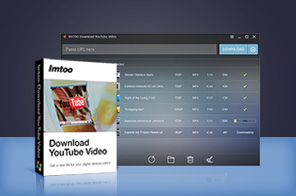
ImTOO Download YouTube Video is a free YouTube video downloader software! Now you can download all your favorite YouTube videos directly to your hard drive and play them anytime you want with the system media player.


Spread the word! Please click the facebook 'like' button!
or wait 20 seconds to activate the download link
Size:33.8MBor wait 20 seconds to activate the download link
- This Free YouTube Video Downloader always works with YouTube latest upgrade!
- Free download YouTube videos FLV, MP4 and Webm, download YouTube 3D videos, save the downloaded videos to your computer hard disk, and then play them with the system media player.
- Download all YouTube HD videos, even 1080p HD and 4k videos, and it's all for FREE.
- Convert YouTube videos to MP3, AVI, MP4, MKV, 3GP, H.264, MPEG, etc. (Paid Function)
- Convert local video files in different formats to other videos formats. (Paid Function)
- Convert YouTube videos for viewing on iPhone/iPad/ iPod, Apple TV, Galaxy, HTC One, Moto X, Nexus, Kindle, Surface, Lumia and other devices. (Paid Function)

Main Functions
 Download video from YouTube for FREE
Download YouTube videos FLV, MP4, and Webm directly to PC at high speed. Download YouTube 3D videos easily. Download YouTube HD videos
Directly download YouTube HD videos, even 1080p HD videos and 4k videos to your computer with this YouTube downloader. Batch downloading
Quickly download multiple YouTube videos at one time. Convert YouTube Videos to Other Videos
Convert YouTube videos to MP3, AVI, MPEG, MP4, 3GP, MKV, and other formats, or convert YouTube videos to be compatible with iPhone/iPad/ iPod, Apple TV, Galaxy, HTC One, Moto X, Nexus, Kindle, Surface, Lumia and other devices. It can also support "Automatically Convert" option to one-step download and convert YouTube videos. Much Powerful Video Converter
Convert your local videos in different formats like AVI, MPEG, WMV, MKV, MP4, H.264/MPEG-4, RM, MKV, WMV HD, etc to any other videos.
What's new
- Add the function of converting automatically after downloading.
- Support downloading 3D video.
- Support downloading 4k video.
- The smarter design brings much easier usage and better user experiences.
- Add the function to convert YouTube videos to other videos.
- Add the function to convert between all your local videos in different formats..
- Support downloading YouTube videos of different resolution ratios.
Key Features
- You can choose to convert YouTube video to MP3, AVI, MPEG, WMV, MP4, FLV, H.264/MPEG-4, DivX, XviD, MOV,MKV, H.264/MPEG-4 AVC (*.mp4), MPEG2 HD Video (*.mpg; *.mpeg), MKV HD Video, Quick Time HD Video (*.mov), WMV HD Video (*.wmv), Audio-Video Interleaved HD Video (*.avi).
- You can set your output file just for specified devices like iPhone, iPad, Galaxy, HTC One, Moto X, Nexus, Kindle, Surface, Lumia, etc.
- Set preferred video quality, resolutions, video bitrate, and formats; Set max simultaneous downloads and conversions; Set custom download and conversion settings.
- Choose the option “Automatically Convert” to let this YouTube Downloader directly convert the videos after downloading.
- This YouTube converter provides the option for you to choose if you want to automatically transfer MP4, MOV and MP3 file to iTunes after downloading and converting.
- Check for software updates automatically at any intervals you choose.
- Super fast and efficient way to download YouTube videos you like!
- This free YouTube video downloader software has easy to use interface.
- Multiple language options: English, German, Japanese, French and Chinese.








User Reviews
"Overall it is a pretty good FREE YouTube video downloader program. I never encounter any unpleasant experience with it, and it does the downloading job all at a pretty decent speed." Paul Watson, NY, USA "Just download this nice freeware Download YouTube Video - Absolutely brilliant. It is so easy to operate and I like the interface very much. I will share it with all my friends. "John Smith, Alaska, USA


-
- iTransfer Platinum Mac

- iPhone Transfer Platinum Mac
- iPad Mate Platinum Mac

- PodWorks Platinum Mac
- iPhone Ringtone Maker Mac
- iPhone Transfer Plus Mac
- iPad Mate for Mac
- PodWorks for Mac
- iPhone Contacts Transfer Mac
- DVD to Video for Mac
- DVD to MP4 Converter for Mac
- DVD to iPhone Converter for Mac
- Blu-ray to Video Converter for Mac
- DVD to iPad Converter for Mac
- DVD to Audio Converter for Mac
- DVD Creator for Mac
- Video Converter for Mac
- MP4 Converter for Mac
- 3D Movie Converter Mac
- Video Editor 2 for Mac
- Audio Converter Pro Mac
- YouTube Video Converter for Mac
- Download YouTube Video for Mac
- YouTube HD Video Downloader Mac
- YouTube to iTunes Converter Mac

- YouTube to iPhone Converter Mac
- HEVC/H.265 Converter for Mac
- iTransfer Platinum Mac
- More