


ImTOO iPhone Video Converter
 Now 5X Faster
Update: Nov 16, 2021
ImTOO iPhone Video Converter is the best iPhone movie converter software specially designed for iPhone 4, iPhone 3GS, iPhone 3G fans to convert all video files like AVI, MPEG, WMV, DivX, MKV, H.264, AVCHD, MOV, MP4, RM, RMVB, and VOB to iPhone videos perfectly. The video to iPhone converter helps you convert and put movies on iPhone easily.
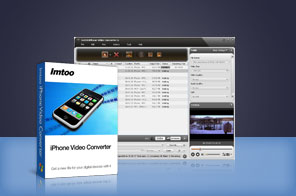


- Convert almost all kinds of SD and HD videos to iPhone MP4/MPEG-4 videos, such as convert AVI to iPhone
- Particularly suited to convert the latest video formats, e.g. AVCHD, H.264, MKV to iPhone
- Create iPhone music from popular music files, as well as extract audios from movies or music videos
- Support TV output with 480p and wide screen
- Support NVIDIA CUDA & AMD APP technology to gain remarkable performance in iPhone video conversion


Main Functions
 iPhone Video Converter
Convert various videos like AVI, MPEG, WMV, DivX, MP4, 3GP to iPhone videos with ease. iPhone Music ConverterConvert music files like MP3, MP2, WMA, RA, AC3, OGG, APE, and CDA to iPhone music MP3, WAV, AAC, AIFF. Extract audio from video as well. CD decoding is also supported.
 Support for multi-core CPUAutomatically detect CPU. Full support for multi-core CPU makes the conversion speed faster than before.
What's new
- Fully compatible with iOS 17, iPhone 15, iPhone 15 Plus, iPhone 15 Pro, iPhone 15 Pro Max
- Fully support iPhone 6, iPhone 6 Plus, iPad mini and iPad Air.
- Optimized the profile parameters of GPU acceleration.
- Supports profile parameters: Main, Baseline and High.
- Supports preset parameters: Ultrafast, Superfast, Veryfast, Faster, Fast, Medium, Slow, Slower.
- Supports adding cover when output to M4A and AIFF formats.
- AIFF format supports metadata.
- Accelerated ACC encoding speed.
- Fixed bugs.
- Adopts multi-thread encoding technology which promotes the converting speed of High Definition videos
- Optimizes profiles for iPhone 4.
Key Features
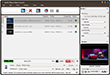
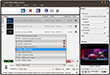
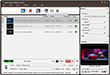
- Convert and move videos to iPhone just in one click.
- The profile settings are sorted by different types.
- CD decoding and power management are available.
- Multithreading and batch conversion mean that you can convert multiple files at the same time.
- Let you adjust parameters including bit rate, frame rate, sample rate, channel, codec, and aspect ratio.
- Able to split one file into several and convert any segment of one file with its start time and duration specified.
- Allow you to add multiple files in the same or different formats to be converted for one source.
- Bitrate Calculator helps you get the output file size instantly.
- Capture and save your favorite movie images as JPG, PNG, GIF, BMP when previewing movies with the resizable player which allows you to switch aspect ratio between 4:3 and 16:9.
- Provides after-done actions (shutdown, exit, hibernate, standby) to free you from having to wait.
- Supports running in the background and save individual profiles after the parameters have been customized.
User Reviews
"I like ImTOO iPhone Video Converter very much. For starters, it is a very intuitive piece of iPhone video converter software. If you're a beginner, there are almost all popular audio and video formats for iPhone. For advanced users, there's full control over every setting for any format. And the conversion from video to iPhone is very fast and the quality is also excellent." Pete Hawkings, Houston "I searched all over the internet and downloaded ImTOO iPhone Video Converter. Before now, I've tried all the video converters for iPhone - especially the FREE ones. Finally, I bought the professional one and found the quality of converted video is very excellent. Great software that works real well."Gavin Wheeler, UK


-
- iTransfer Platinum Mac

- iPhone Transfer Platinum Mac
- iPad Mate Platinum Mac

- PodWorks Platinum Mac
- iPhone Ringtone Maker Mac
- iPhone Transfer Plus Mac
- iPad Mate for Mac
- PodWorks for Mac
- iPhone Contacts Transfer Mac
- DVD to Video for Mac
- DVD to MP4 Converter for Mac
- DVD to iPhone Converter for Mac
- Blu-ray to Video Converter for Mac
- DVD to iPad Converter for Mac
- DVD to Audio Converter for Mac
- DVD Creator for Mac
- Video Converter for Mac
- MP4 Converter for Mac
- 3D Movie Converter Mac
- Video Editor 2 for Mac
- Audio Converter Pro Mac
- YouTube Video Converter for Mac
- Download YouTube Video for Mac
- YouTube HD Video Downloader Mac
- YouTube to iTunes Converter Mac

- YouTube to iPhone Converter Mac
- HEVC/H.265 Converter for Mac
- iTransfer Platinum Mac
- More