


ImTOO iPhone Video Converter for Mac

Update: Nov 16, 2021
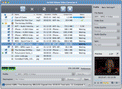
ImTOO iPhone Video Converter for Mac, the best iPhone converter software for Mac, can convert video like AVI to iPhone video/movie for Mac perfectly, helping you convert movies to iPhone video on Mac and transferring movies to iPhone and iPod easily.
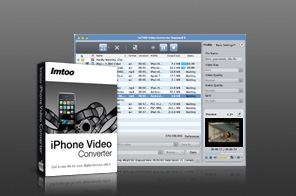


- ImTOO iPhone Video Converter for Mac helps you convert videos and audios like AVI to iPhone video/movie and MP3 to iPhone M4A audio/music.
- ImTOO iPhone Video Converter for Mac provides an ideal solution to convert all popular audio and video files, such as AVI, MPEG, WMV, DivX, 3GP, MP3, AAC and AC3 to iPhone video/audio formats including MP4, MP3, WAV and M4A on Mac.
- The best 3G iPhone video converter provides more features for you: take a snapshot, trim video and audio, and change the output settings.

$35.95
iPhone Video Converter for Mac
Save
$53.93
$53.93
$41.97

Main Functions
 Mac video converter for iPhone
Convert videos like 3GP, 3G2, MPEG, WMV, MP4, M4V, VOB, ASF, DAT, AVI to iPhone MP4/MPEG-4 video/movie. Mac music converter for iPhone
Convert audios like WMA, AAC, AC3, WAV, MP2 to iPhone M4A, WAV, MP3 music; convert MP3 to iPhone; convert CDs to iPhone music. Mac audio extractor from video
Extract audios from videos like 3GP, 3G2, MPEG, WMV, MP4, M4V, VOB, AVI to iPhone M4A, WAV, MP3 audios. Batch conversion and multithreading
Let you convert multiple video and audio files to iPhone one by one in a single click to save time.
What's new
- Fully compatible with iOS 17, iPhone 15, iPhone 15 Plus, iPhone 15 Pro, iPhone 15 Pro Max
- Fully support iPhone 6, iPhone 6 Plus, iPad mini and iPad Air.
- Optimized the profile parameters of GPU acceleration.
- Supports profile parameters: Main, Baseline and High.
- Supports preset parameters: Ultrafast, Superfast, Veryfast, Faster, Fast, Medium, Slow, Slower.
- Supports adding cover when output to M4A and AIFF formats.
- AIFF format supports metadata.
- Accelerated ACC encoding speed.
- Fixed bugs.
- Adopts multi-thread encoding technology which promotes the converting speed of High Definition videos
- Optimizes profiles for iPhone 4
- Lyric support for MP3 format music
- Metadata support for MP4 and M4A formats
- Enables to transfer output files to iPhone 4 directly after conversion;
- Easier to use;
- Adds video profiles for the latest iPhone 4;
- Capability to export the outputted files to iPhone directly after conversion;
- Makes the built-in player resizable;
- Switches the zoom mode between 4:3 and 16:9;
- Classifies the profile settings into different types;
- Able to add transitional effects to merged picture items;
- Adds the support for CD decoding.
Key Features
- ImTOO iPhone Video Converter for Mac supports converting video and audio to iPhone, iPhone 3G, iPhone 3GS, iPhone 4, iPhone 5, iPhone 5s, iPhone 5c, iPhone 6 and iPhone 6 Plus.
- Output converted files to devices immediately after conversion.
- Provides the option to export the outputted files to iPhone directly after converting.
- Directly set the start time and duration and convert your favorite part of video/movie to enjoy on your iPhone.
- Trim video and audio file and convert your desired segment to iPhone, iPhone 3G, iPhone 3GS and iPhone 4 by customizing its length.
- All of video and audio parameters like bit rate, frame rate, sample rate, codec and channel can be selected.
- Support movie image capturing. Capture desired movie images when previewing video file in the built-in resizable player and save them as BMP.
- Customize profile list by selecting common-use formats to display in the list for quick access next time.
- Available in English, German, French, Japanese, Spanish and Chinese interface languages.

User Reviews
"Absolutely fantastic! So easy to use, no previous experience necessary. I am now able to enjoy my favorite videos on my iPhone now. Once again, thanks you for providing an opportunity to trial the software before buying. The service to me was excellent." Svein B, Norway "the best among all.Most reliable
Agree!" Gilberto N, Mexico


-
- iTransfer Platinum Mac

- iPhone Transfer Platinum Mac
- iPad Mate Platinum Mac

- PodWorks Platinum Mac
- iPhone Ringtone Maker Mac
- iPhone Transfer Plus Mac
- iPad Mate for Mac
- PodWorks for Mac
- iPhone Contacts Transfer Mac
- DVD to Video for Mac
- DVD to MP4 Converter for Mac
- DVD to iPhone Converter for Mac
- Blu-ray to Video Converter for Mac
- DVD to iPad Converter for Mac
- DVD to Audio Converter for Mac
- DVD Creator for Mac
- Video Converter for Mac
- MP4 Converter for Mac
- 3D Movie Converter Mac
- Video Editor 2 for Mac
- Audio Converter Pro Mac
- YouTube Video Converter for Mac
- Download YouTube Video for Mac
- YouTube HD Video Downloader Mac
- YouTube to iTunes Converter Mac

- YouTube to iPhone Converter Mac
- HEVC/H.265 Converter for Mac
- iTransfer Platinum Mac
- More