


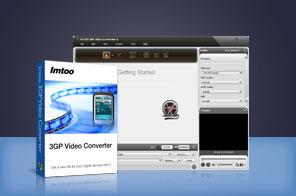


- A great 3GP Converter to convert video formats (incl. AVI, MPEG, H.264/AVC, MKV, DivX, XviD, RM, MP4, MOV, WMV, ASF, FLV) to 3GP & vice versa
- Convert between audio formats (incl. MP3, WMA, WAV, M4A, AAC, OGG)
- Convert videos for 3GP devices (incl. 3GP mobiles & BlackBerrys)
- Simultaneous multi-file conversion with high speed and quality output

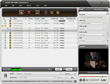
ImTOO 3GP Video Converter is made especially for 3GP mobile and BlackBerry users - you can now convert videos in almost any format even high-definition (HD) to 3GP with ease! The 3GP converter can convert AVI to 3GP, MPEG to 3GP, and formats such as H.264/AVC, MKV, DivX, XviD, RM, MP4, MOV, WMV, ASF, FLV to 3GP and vice versa.
In addition, this 3GP converter can also convert various video formats to BlackBerry MP4, BlackBerry 3GP, BlackBerry AVI, and BlackBerry AMR as well as between audio formats such as MP3, WMA, WAV, M4A, AAC, and OGG. Download the ImTOO 3GP Video Converter FREE and try out its amazing features for yourself. Download ImTOO 3GP Video Converter for free and convert video to 3GP movies playable on Motorola, Nokia mobile phone or other 3GP players now!
Main Functions
 3GP Video Converter
Convert videos to 3GP (AVI to 3GP; MPEG to 3GP; MP4, WMV, H.264/AVC, FLV, etc. to 3GP. 3GP to AVI/MPEG Converter
Convert 3GP to MPEG and 3GP to AVI; convert 3GP to WMV, DivX, MP4, RM, MOV, XviD and so on. Other Video & Audio Converter
Convert between videos; convert between audio formats such as MP3, WMA, WAV, M4A, AAC, and OGG. BlackBerry Video Converter
Convert videos to BlackBerry MP4, BlackBerry 3GP, BlackBerry AVI, and BlackBerry AMR.
What's new
- Fully compatible with iOS 17, iPhone 15, iPhone 15 Plus, iPhone 15 Pro, iPhone 15 Pro Max
- Fully support iPhone 6, iPhone 6 Plus
- Fully support iPhone 5, iPad mini and iPad 4.
- Optimized the profile parameters of GPU acceleration.
- Supports profile parameters: Main, Baseline and High.
- Supports preset parameters: Ultrafast,Superfast,Veryfast,Faster,Fast,Medium,Slow,Slower.
- Supports adding cover when output to M4A formats.
- Accelerated ACC encoding speed.
- Fixed bugs.
- Adopts multi-thread encoding technology which promotes the converting speed of High Definition videos.
- Lyric support for MP3 format music.
- Metadata support for MP4 and M4A formats.
- Supports AMD APP encoding technology
- Makes the built-in player resizable
- Switches the zoom mode between 4:3 and 16:9
- Classifies the profile settings into different types
- Adds the function of power management
- Supports CD decoding
Key Features
- Adopt NVIDIA CUDA & AMD APP technology to gain the remarkable performance in 3GP video converting.
- The output formats of this 3GP converter are sorted by different types.
- CD decoding and power management are available.
- Save time by converting multiple files simultaneously with support for multithreading and batch conversion.
- Split a large file into several so you can fit it onto your device.
- ImTOO 3GP Video Converter enables you to convert a segment from a video according to predefined start time and duration.
- Ability to convert a file into multiple formats simultaneously.
- Able to adjust general and advanced parameters including bit rate, frame rate, sample rate, codec, and quality.
- Allows you to run 3GP video conversions in the background to save CPU resources.
- Preview video, take snapshots of movie images, and save them as JPG, PNG, GIF, or BMP.
- The built-in player allows to switch aspect ratio between 4:3 and 16:9, and is also a stand-alone player.
- Ability to preset the application to auto exit, shut down, hibernate, or stand by your PC so you don’t have to wait until the end of a task.



User Reviews
"I recently purchased your 3GP video converter software for my 3GP Mobile and the playback clarity is exceptional. With a 1 GB SD card, you can easily transfer 4 full length movies and play them on the mobile phone. Highly recommend getting the registered version. Unregistered users can only record about 3-5 minutes." John Boen, Canada "Great product and great support! Thank you for guiding me through the program's features. I am really happy with the speed of the conversion and with the outstanding quality of my 3GP videos. I will recommend your 3GP converter to my friends." D. Wens Genval, USA


-
- iTransfer Platinum Mac

- iPhone Transfer Platinum Mac
- iPad Mate Platinum Mac

- PodWorks Platinum Mac
- iPhone Ringtone Maker Mac
- iPhone Transfer Plus Mac
- iPad Mate for Mac
- PodWorks for Mac
- iPhone Contacts Transfer Mac
- DVD to Video for Mac
- DVD to MP4 Converter for Mac
- DVD to iPhone Converter for Mac
- Blu-ray to Video Converter for Mac
- DVD to iPad Converter for Mac
- DVD to Audio Converter for Mac
- DVD Creator for Mac
- Video Converter for Mac
- MP4 Converter for Mac
- 3D Movie Converter Mac
- Video Editor 2 for Mac
- Audio Converter Pro Mac
- YouTube Video Converter for Mac
- Download YouTube Video for Mac
- YouTube HD Video Downloader Mac
- YouTube to iTunes Converter Mac

- YouTube to iPhone Converter Mac
- HEVC/H.265 Converter for Mac
- iTransfer Platinum Mac
- More