


ImTOO Movie Maker

Update: Nov 16, 2021
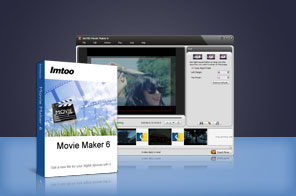


- Make HD movies from camcorder videos (MTS, M2TS), HD videos (HD AVI, HD MPEG-2/4, HD VOB, HD WMV), and SD videos (AVI, 3GP, M4V, MPEG, MP4, RM, RMVB, FLV, VOB, MPV, MOV, DAT, ASF, WMV).
- Turn your favorite video clips into movies.
- Convert video formats to devices such as iPod, iPhone, Apple TV, PSP, PS3, PMP, Mobile phone, Xbox, Zune, Wii, and DS.
- Add and edit transitions, title and soundtracks.

Ver:6.0
- As a professional movie making software, ImTOO Movie Maker helps you quickly create HD-quality and standard-definition movies from videos so you can share your masterpieces on popular devices like iPod, iPhone, Apple TV, PSP, PS3, PMP, Mobile phone, Xbox, Zune, Wii and DS.
- With this easy-to-use movie maker software, you can turn nearly all video clips into movies, including camcorder videos (MTS, M2TS), HD videos (HD AVI, HD MPEG-2/4, HD VOB, HD WMV), and common videos (AVI, 3GP, M4V, MPEG, MP4, RM, RMVB, FLV, VOB, MPV, MOV, DAT, ASF, WMV).
- Once you have made a movie, you can customize it by adding transitional effects and sound track. You can even clip segments from it or crop its frame size. But if you prefer a simple video, you can also create movies without special effects.
Main Functions
 Create Movies from Multiple Videos
All of your HD videos, Camcorder videos, or common videos can be made into various formats of movies, including mainstream videos (e.g. AVI, MPEG, MP4, FLV, DivX, XviD, MOV, RMVB, 3GP), and HD videos (e.g. MPEG-2 TS HD, Quick Time HD, WMV HD). Professional-Looking Transitions
Newly added more than 20 transitional effects, including Arrows Vertical, Clock, Diamond, Double Circle, Ripple, Mosaic and etc to realize seamless and fun transitions between video. Random mode is available, you can let the application add random transitional effects. Clip Videos
Set the start time and end time for the video segments to be clipped. After you apply, all clips will be listed in the video list. Add Music
Add a music soundtrack to set the mood for your movie. Full-Screen Preview
Have a full-screen preview within the embedded media player to get a clearer view on videos before and after changes.
What's new
- Added the support for the newest iPhone 4.
Key Features
- Output your movie in AVI, MPEG-1/2/4, DivX, XviD, ASF, MOV, RM, WMV formats to be played on devices such as iPod, iPhone, PSP, PS3, Zune, Xbox, Wii, and DS.
- The movie making software lets you easily crop a video frame by dragging the mouse point or customizing the area size to get desired frame size, and remove unwanted subtitle, logo or title.
- Backup clips you have edited so you won’t have to worry about losing any piece of your best works.
- Automatically check for updates. You can set the core number to get the best performance with multi-core CPU support.
- Set a post movie-making action (exit, standby, shutdown or hibernate) so you can leave the movie maker software to do its job.
- Available in the following languages: English, German, French, Simplified Chinese, Traditional Chinese and Japanese.
User Reviews
"I have looked online and tried many movie making software programs including the Windows Movie Maker. Your software is the easiest one. It suits my video editing needs and supports so many video formats." John, Canada


-
- iTransfer Platinum Mac

- iPhone Transfer Platinum Mac
- iPad Mate Platinum Mac

- PodWorks Platinum Mac
- iPhone Ringtone Maker Mac
- iPhone Transfer Plus Mac
- iPad Mate for Mac
- PodWorks for Mac
- iPhone Contacts Transfer Mac
- DVD to Video for Mac
- DVD to MP4 Converter for Mac
- DVD to iPhone Converter for Mac
- Blu-ray to Video Converter for Mac
- DVD to iPad Converter for Mac
- DVD to Audio Converter for Mac
- DVD Creator for Mac
- Video Converter for Mac
- MP4 Converter for Mac
- 3D Movie Converter Mac
- Video Editor 2 for Mac
- Audio Converter Pro Mac
- YouTube Video Converter for Mac
- Download YouTube Video for Mac
- YouTube HD Video Downloader Mac
- YouTube to iTunes Converter Mac

- YouTube to iPhone Converter Mac
- HEVC/H.265 Converter for Mac
- iTransfer Platinum Mac
- More