


ImTOO iPhone Ringtone Maker for Mac

Update: Nov 23, 2023
ImTOO iPhone Ringtone Maker for Mac provides the easiest and quickest way to create iPhone ringtone from video or music and transfer it to your iPhone directly. This Mac iPhone ringtone maker software supports converting almost all video/audio formats to M4R files and trimming video/audio to make the most colorful clip as your iPhone ringtone.
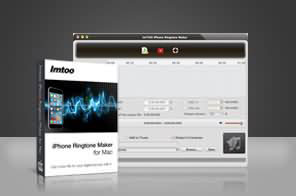




- ImTOO iPhone Ringtone Maker for Mac can create iPhone 3.0 ringtone from multiform video and audio files like AVI, MPEG, WMV, DivX, MP4, H.264/AVC, AVCHD, MKV, RM, MOV, XviD, 3GP, MP3, WMA, WAV, RA, M4A, AAC, AC3, OGG, etc.
- As a Mac iPhone ringtone converter, it allows you to trim video/audio file and convert any preferred segment to iPhone ringtone.
- After making iPhone ringtone, ImTOO iPhone Ringtone Maker for Mac can directly transfer the M4R file to your iPhone as iPhone ringtone. Now iPhone 8, iPhone 8 Plus, iPhone X, iOS 17 is supported.
- Ability to transfer ringtones to iTunes (iTunes 12 is supported now).

Main Functions
 Make iPhone ringtone from music fileNo matter what music format, MP3, WMA, WAV, RA, M4A, AAC, AC3, OGG, or others, ImTOO iPhone Ringtone Maker for Mac can convert it to M4R file as your iPhone ringtone.
 Turn video into M4R ringtone for iPhone
Extract music from your favored video file like AVI, MPEG, WMV, DivX, MP4, H.264/AVC, AVCHD, MKV, RM, MOV, XviD, 3GP and so on, and make iPhone ringtone with it. Directly transfer ringtone to iPhoneNo iTunes needed, ImTOO iPhone Ringtone Maker for Mac can directly transfer the converted M4R ringtone to your iPhone after making iPhone ringtone. Convenient and fast!
What's new
- Fully compatible with iOS 17, iPhone 15, iPhone 15 Plus, iPhone 15 Pro, iPhone 15 Pro Max
- Fully compatible with iOS 7, iPhone 5s, iPhone 5c, iPad Air
- Fully support iOS 6, iTunes 10.7, and iPhone 5
- Added the display of audio waveform for more precise adjustments of start point and end point.
- Improved user experience in ringtone editing to make ringtones for iPhone more handily.
- Enriched ringtone management functions:
- Added the function of appending ringtone files from PC to iPhone directly.
- Added the function of renaming ringtones on iPhone.
- Added the function of exporting ringtones on iPhone to iTunes and PC.
- Added basic information of audio and video files, like cover, name, author and album name.
- Supports adding files by using drag and drop.
- Creates ringtone more precisely by setting the time to the millisecond.
- Supports ringtone fade-in and fade-out effects.
- Ringtone volume adjustment capability.
- Ringtone management function: option to delete the imported ringtones.
Key Features
- Fade-in and fade-out effects make your ringtone sound smooth and harmony.
- Precise time setting up to millisecond for creating iPhone ringtone
- If you only prefer the most colorful music segment, then just drag and drop to get the segment and turn it into iPhone ringtone.
- To help you check the music clip is just the very part you want, the Mac iPhone ringtone creator provides a built-in player to play it before converting.
- The interface is so concise that you can easily make iPhone ringtone just at a glance: add a video or music file, and hit one button to make ringtone.
- English, German, French, Spanish, Italian, Japanese, Traditional and Simplified Chinese interface languages are offered in the Mac iPhone ringtone maker.


User Reviews
"I just bought your iPhone Ringtone Maker for Mac because when I tested the trial I saw that it was doing what I needed which is to create ringtone and transfer it on my iPhone and I was happy with the overall interface. Great job and thank you."Alex, USA"I just wanted to let you know It worked!!!I will definitely recommend your iPhone Ringtone Maker for Mac to others." Jos, USA


-
- iTransfer Platinum Mac

- iPhone Transfer Platinum Mac
- iPad Mate Platinum Mac

- PodWorks Platinum Mac
- iPhone Ringtone Maker Mac
- iPhone Transfer Plus Mac
- iPad Mate for Mac
- PodWorks for Mac
- iPhone Contacts Transfer Mac
- DVD to Video for Mac
- DVD to MP4 Converter for Mac
- DVD to iPhone Converter for Mac
- Blu-ray to Video Converter for Mac
- DVD to iPad Converter for Mac
- DVD to Audio Converter for Mac
- DVD Creator for Mac
- Video Converter for Mac
- MP4 Converter for Mac
- 3D Movie Converter Mac
- Video Editor 2 for Mac
- Audio Converter Pro Mac
- YouTube Video Converter for Mac
- Download YouTube Video for Mac
- YouTube HD Video Downloader Mac
- YouTube to iTunes Converter Mac

- YouTube to iPhone Converter Mac
- HEVC/H.265 Converter for Mac
- iTransfer Platinum Mac
- More