


ImTOO DVD to MP4 Converter for Mac

Update: Nov 16, 2021
ImTOO DVD to MP4 Converter for Mac is smart DVD to MP4 converter/Converter for Mac users to convert home DVD to MP4, PSP MP4, iPod MP4 and iPhone MP4 fast and easily. ImTOO DVD to MP4 Converter for Mac is also a Mac DVD audio extractor that can convert home DVD to MP3, M4A and AAC with top quality.
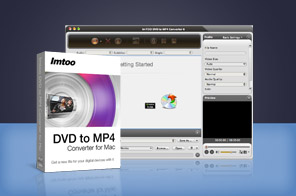


- ImTOO Home DVD to MP4 Converter for Mac is powerful Mac Home DVD to MP4 converter to convert Home DVD to MP4 on Mac, for example, convert Home DVD to MPEG-4/AVC, AVI, MPEG, DivX, XviD, H.265/HEVC etc., and convert Home DVD to audio formats including MP3, M4A, and AAC.
- This Home DVD to MP4 converter for Mac software provides well-customized settings: clip/split files, select subtitle and audio track, customize file size.
- ImTOO Home DVD to MP4 Converter for Mac is an ideal solution to convert Home DVD movie to video/audio files for playback on iPod, iPod touch, iPhone, Apple TV, Archos, iRiver, Creative Zen and MP4/MP3 players.
- Can't rip/convert DVD with copyright

Main Functions
 Mac DVD to MP4 converter
Convert DVD to MP4, AVI, MPEG-4, DivX, XviD, iPod touch MPEG-4, iPhone MP4, PSP MP4, MP4 AVC on Mac. Mac DVD audio converter
Convert DVD to MP3 and convert DVD to audio formats like AAC and M4A on Mac. Extract audio from DVD movie. Support almost all MP4/MP3 players
Convert DVDs and watch them on iPod, iPod touch, iPhone, Apple TV, PSP, PS3, Archos, iRiver, Creative Zen. Multithreading and batch conversion
Multithreading and batch conversion mean the software can auto convert files one by one to shorten time.
What's new
- Fully compatible with iOS 17, iPhone 15, iPhone 15 Plus, iPhone 15 Pro, iPhone 15 Pro Max
- Fully support iPhone 5, iPad mini and iPad 4.
- Optimized the profile parameters of GPU acceleration.
- Supports profile parameters: Main, Baseline and High.
- Supports preset parameters: Ultrafast, Superfast, Veryfast, Faster, Fast, Medium, Slow, Slower.
- Supports adding cover when output to M4A formats.
- Fixed bugs.
- Adopts multi-thread encoding technology which promotes the converting speed of High Definition videos.
- Optimizes profiles for iPad and iPhone 4.
- Lyric support for MP3 format music.
- Metadata support for MP4 and M4A formats.
- Added High Definition video profile for iPad 2;
- Support more devices like Motorola XOOM and Samsung P1000;
- Added video profiles for the newest iPhone 4;
- Makes the built-in player resizable;
- Switch the zoom mode between 4:3 and 16:9;
- Classifies the profile settings into different types;
- Added the support for Spanish language interface.
Key Features
- Prepare lots of optimized profiles for divers MP4 players, and allow you to chage profile parameters to create a new one.
- Clip DVD title/chapter to extract any segments and optionally merge them into a new one or just output them respectively.
- Split one DVD title/chapter into several pieces whose file size or time length can be customized.
- Enter the output file size you want in the Bitrate Calculator, then get corresponding bit rate promptly and output file with exact size you entered.
- Add multiple profiles to one DVD title/chapter and get them converted at one time to fit the needs of multiple devices.
- Convert DVD's segment with the start time and duration specified, if you don't want to convert a whole movie.
- Allow you to select any DVD titles/chapters to convert with any available subtitle, audio and angle.
- To improve file quality, adjust the desired parameters like bit rate, sample rate, codec, aspect, channel.
- Provides you with a built-in resizable player to preview your favorite DVD movie and snap desired movie images.
- Available in English, French, German, Spanish, Japanese and Chinese.
User Reviews
"I have been evaluating your DVD to MP4 Converter for Mac program with a view to buying it to convert dvd to use on my Nokia N95 mobile phone, which already has Spiderman 3 loaded on it in full screen. My first reaction to your programme was "oh my God how easy is this". It converted the first 5 minutes really quickly. I then put the file through the Nokia video suite to enable me to watch on my phone. Easy!!" Amy, UK "First, I want to tell you that I'm generally happy with the product - DVD to MP4 Converter for Mac : it does what it said it would do, the result is great."Tim, USA


-
- iTransfer Platinum Mac

- iPhone Transfer Platinum Mac
- iPad Mate Platinum Mac

- PodWorks Platinum Mac
- iPhone Ringtone Maker Mac
- iPhone Transfer Plus Mac
- iPad Mate for Mac
- PodWorks for Mac
- iPhone Contacts Transfer Mac
- DVD to Video for Mac
- DVD to MP4 Converter for Mac
- DVD to iPhone Converter for Mac
- Blu-ray to Video Converter for Mac
- DVD to iPad Converter for Mac
- DVD to Audio Converter for Mac
- DVD Creator for Mac
- Video Converter for Mac
- MP4 Converter for Mac
- 3D Movie Converter Mac
- Video Editor 2 for Mac
- Audio Converter Pro Mac
- YouTube Video Converter for Mac
- Download YouTube Video for Mac
- YouTube HD Video Downloader Mac
- YouTube to iTunes Converter Mac

- YouTube to iPhone Converter Mac
- HEVC/H.265 Converter for Mac
- iTransfer Platinum Mac
- More