


ImTOO MOV Converter
 Now 5X Faster
Update: Nov 16, 2021
ImTOO MOV Converter is the powerful QuickTime MOV converter software which can convert QuickTime MOV to WMV, MOV to MPEG, MOV to DivX and MOV to AVI format, especially convert QuickTime HD video. It also supports converting MOV files to audio formats like MP3, WMA, AAC and WAV. If you are searching for software to convert MOV to other videos, ImTOO MOV Converter is surely your best choice.
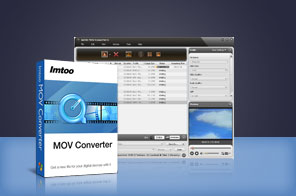


- ImTOO MOV Converter is a QuickTime MOV converter which helps you convert QuickTime MOV to MPEG, QuickTime QT to MPEG. It supports batch video conversion for these video formats including AVI, MOV, WMV, MEPG-1 and MPEG-2.
- If you have problems with the Windows Media player playing an MOV file, than the QuickTime MOV Converter is really what you need! With the MOV converter, you can not only convert MOV to AVI, MOV to WMV and MOV to MPEG with excellent quality, but also customize video/audio settings.
- With the powerful built-in Quick Time video decoder, ImTOO MOV Converter supports almost all MOV/QT files and HD Quick Time files.
Main Functions
 MOV to MPEG converter
Convert MOV Quick Time to AVI, MOV to MPEG-1, MOV to MPEG-2, MOV to DivX, MOV to WMV, HD MOV to MPEG. MOV to MP3 converterConvert MOV Quick Time to audios like MP3, WAV, WMA, AAC, e.g. MOV to MP3, MOV to WMA, MOV to WAV.
 Multi-core CPU optimization
Support for multi-core CPU technology is designed to make the most of your CPU and speed up the video conversion.
What's new
- Fully compatible with iOS 17, iPhone 15, iPhone 15 Plus, iPhone 15 Pro, iPhone 15 Pro Max
- Fully support iPhone 6, iPhone 6 Plus
- Fully support iPhone 5, iPad mini and iPad 4.
- Optimized the profile parameters of GPU acceleration.
- Supports profile parameters: Main, Baseline and High.
- Supports preset parameters: Ultrafast, Superfast, Veryfast, Faster, Fast, Medium, Slow, Slower.
- Accelerated ACC encoding speed.
- Fixed bugs.
- Adopts multi-thread encoding technology which promotes the converting speed of High Definition videos
- Lyric support for MP3 format music.
Key Features
- Resizable player and adjustable aspect ratio (4:3 and 16:9) are available.
- Batch conversion and multithreading help you convert multiple files all at the same time without time-and-time clicks.
- Able to split one MOV file into several and convert any segment of one file by entering the start time and duration.
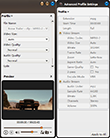
- Change basic and advanced parameters like bit rate, frame rate, and codec to get a better output quality.
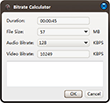
- Compress your MOV videos with the help of Bitrate Calculator by specifying the output file size you want.
- Add multiple profiles in the same or different formats for one MOV file and convert them at the same time.
- Run the MOV Converter in the background when converting; auto shut down the computer when the job is complete.
- Support playing the output video files for preview with the built-in player, where you can also view file information.
- Capture your favorite movie images for Quick Time video files and save as JPG, GIF, PNG, BMP files.




User Reviews
"I just wanted to thank you for this incredible MOV video converter - ImTOO MOV Converter! There’s no doubt, it blows away the competition. I’ve tried more than 10 other programs. Thank God, I found yours! The process about MOV to AVI, MOV to MPEG seems very simple and fast. Furthermore, the quality of converted MOV video is excellent!!!" Anthony, Spain "You have a great product for converting mov to wmv files. I am still testing your MOV Converter, & getting to know the features. I like the easy to use drag & drop files. I am a student, so money is tight right now. I will be purchaseing this software soon. So far it is everything I have been looking for to make my video files from my camera (.mov) to a usable format (.wmv) so I can watch them with windows media player,& edit them with windows movie maker. Thanks."M.w., Bilsland


-
- iTransfer Platinum Mac

- iPhone Transfer Platinum Mac
- iPad Mate Platinum Mac

- PodWorks Platinum Mac
- iPhone Ringtone Maker Mac
- iPhone Transfer Plus Mac
- iPad Mate for Mac
- PodWorks for Mac
- iPhone Contacts Transfer Mac
- DVD to Video for Mac
- DVD to MP4 Converter for Mac
- DVD to iPhone Converter for Mac
- Blu-ray to Video Converter for Mac
- DVD to iPad Converter for Mac
- DVD to Audio Converter for Mac
- DVD Creator for Mac
- Video Converter for Mac
- MP4 Converter for Mac
- 3D Movie Converter Mac
- Video Editor 2 for Mac
- Audio Converter Pro Mac
- YouTube Video Converter for Mac
- Download YouTube Video for Mac
- YouTube HD Video Downloader Mac
- YouTube to iTunes Converter Mac

- YouTube to iPhone Converter Mac
- HEVC/H.265 Converter for Mac
- iTransfer Platinum Mac
- More