


ImTOO iPhone Transfer

Update: Nov 23, 2023
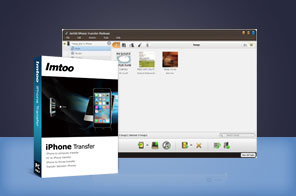




- Transfer music, movies, ebooks, messages, contacts, apps and photos from iPhone to computer or iTunes
- Backup your iPhone files to new computer
- The ideal iPhone backup software to transfer from iPhone to iTunes, between iPhone and iPod
- Create, delete and edit photo albums to your preference
- Synchronize your iPhone via Wi-Fi
- Suppurt all iPhone/iPad/iPod model, iOS 17 and iTunes 12.


ImTOO iPhone Transfer is the ultimate upgrade for your iPhone. Sick of iTunes' limitations? Then this is your solution. Transfer files between your computer, iPhone, and iTunes. With the ImTOO iPhone Transfer, you are free to transfer music, videos, and photos from PC to iPhone and iPhone to PC. Backup and transfer your iPhone music and videos onto your computer and iTunes. Photos and videos shot by the device are also supported.
ImTOO iPhone Transfer works well with all iPhone/iPad/iPod device, and fully supports multiple iOS devices simultaneously. No other iPhone transferring software currently on the market is able to do this with the same efficiency. As an iPhone backup software, it helps you transfer music, videos, photos and applications from iPhone to computer hard drive. It can also transfer files from iPhone straight to iTunes.
iPhone Products Comparison: iPhone Ringtone Maker, iPhone Contacts Transfer, iPhone Photo Transfer, iPhone Transfer, iPhone Transfer Plus, iPhone Transfer Platinum
Main Functions
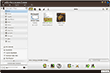
 iPhone to PC Transfer
Transfer music, videos, movies and photos from iPhone to computer for content backup. Copy photos from photostream to PC. PC to iPhone Transfer
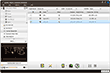
Best iTunes Alternative can transfer music, videos, movies, photos on your computer to iPhone with no need to remove your original files. iPhone to iTunes Transfer
Import iPhone audio and video files to iTunes library.
What's new
- Fully compatible with iOS 17, iPhone 15, iPhone 15 Plus, iPhone 15 Pro, iPhone 15 Pro Max
- Fully support iOS 6, iTunes 11.0 and iPhone 5, iPod touch 5, iPod nano 7
- Strengthened the function of playlist management
- Added the function of copying photos from photostream to computer
- Provided support for importing contacts exported from Incredimail
- Added the function of dragging and dropping apps
- Fixed the bug of failing to show artworks of music files
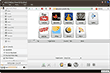
- App transfer and app document management
- Import and export contacts
- Synchronize your iPhone via Wi-Fi
- Back up your SMS messages
- Move songs to another playlist
Key Features
- Support all iPhone/iPad/iPod types: iPad, iPad mini, iPad Air, iPad Pro (12.9/9.7/10.5/11 inch), iPod nano/mini/shuffle/classic/touch, iPhone 3G/3GS/4/5/5S/5C/SE/6/6S/7/8/X/XS/XR/11/12/13/14/15 Series.
- Fully support data sync via Wi-Fi
- Fully support the latest iOS 17 and iTunes 12
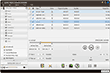
- Copy playlist to iTunes and customize the column for showing file details.
- Connect several iOS devices and transfer files between them at the same time.
- Drag and drop application between PC and iPad, also support to manage application documents.
- Delete songs from one playlist and then move them to another one to create your very own playlist.
- Transfer, edit and manage iPhone ringtones and eBooks in PDF or EPUB format with ease.
- Support importing contacts from many Address Book programs including incredimail.
- Manage iPhone as a Portable Hard Disk
- Photos and videos shot by the device are read and exported.
- Use Filter and Quick Search to find music, videos, photos and anything you want just as easily as iTunes.
- Create and edit your own playlists to manage and classify your music, videos and photos.
- Manage and organize iPhone photos into photo albums which you can create, delete and edit freely.
- Adding one photo into different albums is available.
- Provide multiple viewing modes: songs, albums, artists and genres. Add your desired picture for the file cover in the thumbnails mode.
- Multi-lingual interfaces are offered in language of English, French, Italian, Spanish, German, Japanese, Simplified or Traditional Chinese.
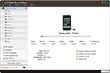
User Reviews
"Sort of a shame that other companies don't have iPhone backup app and customer service like you all do?! I've never seen anything like it! WOW! :)" Monty G, US "ImTOO iPhone Transfer is probably currently the best of its kind on the market. It is simplistic, reliable and has many features. Great price for quality!"Charlie F, US


-
- iTransfer Platinum Mac

- iPhone Transfer Platinum Mac
- iPad Mate Platinum Mac

- PodWorks Platinum Mac
- iPhone Ringtone Maker Mac
- iPhone Transfer Plus Mac
- iPad Mate for Mac
- PodWorks for Mac
- iPhone Contacts Transfer Mac
- DVD to Video for Mac
- DVD to MP4 Converter for Mac
- DVD to iPhone Converter for Mac
- Blu-ray to Video Converter for Mac
- DVD to iPad Converter for Mac
- DVD to Audio Converter for Mac
- DVD Creator for Mac
- Video Converter for Mac
- MP4 Converter for Mac
- 3D Movie Converter Mac
- Video Editor 2 for Mac
- Audio Converter Pro Mac
- YouTube Video Converter for Mac
- Download YouTube Video for Mac
- YouTube HD Video Downloader Mac
- YouTube to iTunes Converter Mac

- YouTube to iPhone Converter Mac
- HEVC/H.265 Converter for Mac
- iTransfer Platinum Mac
- More