


ImTOO iPhone Contacts Transfer

Update: Nov 23, 2023
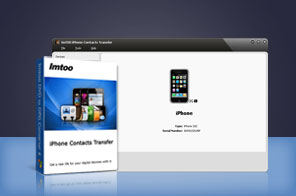


- Backup and restore iPhone contacts - Transfer contacts directly from iPhone to computer and restore contacts data in need
- Support for transferring contacts on iCloud.
- Export iPhone contacts to CSV or vCard files which can be imported to online address books including: Google, Yahoo, Outlook, Windows, Apple Address Book, Hotmail and etc
- Import/Sync various contact cards onto your iPhone from Address Book programs and other phones: Nokia, Blackberry, Android phone, Windows phone and etc
- Contact information management: sort, delete, save contact pictures to computer
- Excellent and clean interface makes contact transferring a breeze
- Support iPhone 8, iPhone 8 Plus, iPhone X, iOS 17 and iTunes 12 now


Take control of your iPhone’s contacts with the new ImTOO iPhone Contacts Transfer! Import/export contacts directly from/to popular Address Book programs, transfer contacts between different iOS devices and other mobile phones, back up your iPhone contacts for ultimate safety, and restore iPhone contacts in case of accidental deletion.
ImTOO iPhone Contacts Transfer is packed full of scintillating features that will allow you to enjoy great security and safety. You can also use this program to completely update and be in sync of various online address books including Google Contacts, Yahoo Address Books, Outlook, Windows Address Books and so forth by introducing the CSV and vCard(.vcf) files exported from the program. Contact information management functions are provided: sort contacts the way you want, delete any contact item, save the pictures of contacts to your local computer and etc.
Don’t hesitate, grab a copy and download to try ImTOO iPhone Contacts Transfer for yourself today!
iPhone Products Comparison: iPhone Ringtone Maker, iPhone Contacts Transfer, iPhone Photo Transfer, iPhone Transfer, iPhone Transfer Plus, iPhone Transfer Platinum
Main Functions
 Comprehensive iPhone Contacts Back-up
Fully back up all your iPhone contacts onto your computer for complete convenience and organization. Transfer Contacts from iCloud
Transfer your backup contacts from iCloud to your iPhone. Import/Export contacts to/from iPhone
Support importing/exporting contacts in format of CSV and vCard file(.vcf) to/from the most popular Address Book programs. Address book contact transfer Supported
The most popular online contact address books are supported - Google Contacts, Yahoo Address Books, Outlook, Windows Address Books, Apple Address Book, Fastmail, Rediff Mail, Mail.com, Loposte, Orange, Skype, Freenet.de, Incredimail, and other address books and more. Share Contacts between Multiple Phones
Share contacts from one iPhone to another, or to other mobile phones, like Nokia, Blackberry, Android phone, Windows Phone and etc. Restore iPhone Contacts
Ever worry about what to do in a disastrous event such as a contact wipe-out? Well, worry no more, as you can restore all of your contacts back to your iPhone in their original state with a simple click of a button.
What's new
- Fully compatible with iOS 17, iPhone 15, iPhone 15 Plus, iPhone 15 Pro, iPhone 15 Pro Max
- Fully compatible with iOS 7, iPhone 5s, iPhone 5c, iPad Air.
- Fully support iOS 6, iTunes 10.7, and iPhone 5
- Provided support for importing contacts exported from Incredimail.
- Provided support for transferring contacts on iCloud.
- Added the function of importing contacts from Hotmail, Aol Mail, and Thunderbird to iOS devices through .csv file.
- Added the function of exporting contacts to vCard files (.vcf) for Outlook and Windows Contacts.
- Optimized the manners of importing and exporting contacts.
- Added the function of saving photo to computer.
Key Features
- Advanced detailed user searching makes contact management a breeze.
- Contact sorting makes your contacts completely organized.
- Save the pictures of contacts from iPhone to your computer.
- Have a copy of your contacts on your computer for whenever you need it.
- Elegantly designed and simple to use user interface makes ImTOO iPhone Contacts Transfer a top choice for iPhone contacts management!
- Choice of 8 different languages: English, French, German, Italian, Spanish, Japanese, Traditional and Simplified Chinese.

User Reviews
"This is the most amazing apps I've ever used. With it, I can back up my contacts easily and transfer to my new iPhone4 directly without another software!" Lucas, Canada


-
- iTransfer Platinum Mac

- iPhone Transfer Platinum Mac
- iPad Mate Platinum Mac

- PodWorks Platinum Mac
- iPhone Ringtone Maker Mac
- iPhone Transfer Plus Mac
- iPad Mate for Mac
- PodWorks for Mac
- iPhone Contacts Transfer Mac
- DVD to Video for Mac
- DVD to MP4 Converter for Mac
- DVD to iPhone Converter for Mac
- Blu-ray to Video Converter for Mac
- DVD to iPad Converter for Mac
- DVD to Audio Converter for Mac
- DVD Creator for Mac
- Video Converter for Mac
- MP4 Converter for Mac
- 3D Movie Converter Mac
- Video Editor 2 for Mac
- Audio Converter Pro Mac
- YouTube Video Converter for Mac
- Download YouTube Video for Mac
- YouTube HD Video Downloader Mac
- YouTube to iTunes Converter Mac

- YouTube to iPhone Converter Mac
- HEVC/H.265 Converter for Mac
- iTransfer Platinum Mac
- More