


ImTOO MPEG to DVD Converter

Update: Nov 16, 2021
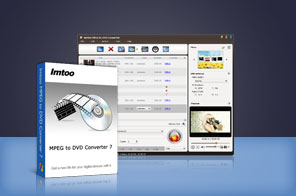


- Burn MPEG to Home DVD disc, convert MPEG to Home DVD folder or ISO file.
- Other supported video file formats include MPEG-1, MPEG-2, MPEG-4, MP4, M2V, DAT, VOB, and H.264.
- Create a unique DVD menu, clip video, crop video size, adjust video effect, add watermarks, subtitles and soundtracks.
- Multi-core CPU processing and multithread conversion is supported, greatly save time for making DivX into DVDs.

ImTOO MPEG to DVD Converter makes it easy to convert MPEG to DVD and burn MPEG to DVD discs seamlessly! This professional MPEG to DVD burner software also supports converting MPEG to DVD folder or ISO image file. It's the perfect program to burn MPEG/MPG format videos (as well as other video file formats) into DVD with a lot of shinning DVD authoring features including creating DVD menu, clipping, cutting video image, cropping video size, adding soundtracks/subtitles/watermarks and changing video effects.
Main Functions
 MPEG to DVD Converter
Convert and burn MPEG to DVD, plus other formats like MPEG-4, MP4, DAT, M2V, VOB, H.264 and MPEG-2. DVD Burner
Burn MP4, MPEG-2, MPEG-1, DAT, VOB, M2V, MPEG-4, H.264, MPG to DVD disc, DVD folder or ISO image file. Customize Your DVD
ImTOO MPEG to DVD Converter lets you customize your DVD with editing tools to clip video segments, crop video picture, add video effects, attach subtitles and audio tracks plus set video and audio settings before burning to DVD. Multithread and Multi-Core Processing
Multithread and multi-core processing mean the convert and burn method is maximized to give you the utmost speed in DVD-conversion/burn process.
What's new
- Regrouped menu templates; added popular menu templates.
- Added support for the DVD opening film clip.
- Ability to use a picture or video clip as the menu title miniature.
- Ability to add and edit multiple soundtracks and subtitles, crop video image, add special effects and watermarks.
- Ability to preview the original and the edited videos side-by-side for easy comparison.
- Added support for multithread conversion and multi-core CPU processing.
Key Features
- Numerous menu templates to choose from, add background picture, music, title and opening clip, even attach a video or picture thumbnail to personalize the DVD menu. And the menu templates can be downloaded.
- Clip video segments you wish and merge them to convert and burn it onto your DVD disc.
- Crop frame size; adjust image brightness/saturation/contrast, add special effects, and add picture/text watermark.
- Add multiple audio tracks and subtitles of different languages to your DVD movie, and adjust the delay time to fit the scene.
- ImTOO MPEG to DVD Converter enables you to burn MPEG file to different DVD discs: DVD-R, DVD+R, DVD-RW, DVD+RW, DVD+R DL, DVD-R DL, DVD-5, DVD-9.
- Set video/audio quality, bit rate, aspect ratio, television standard, aspect ratio, resize mode and so on to burn custom DVD.
- Create chapters by preset interval.
- Set the DVD to skip menu and play the movie straight away.
- Preview the original and edited video file with the built-in player; take snapshot of selected scenes and save as picture file.
- Set an action (hibernate, standby, exit or shutdown) after a task is done to save time and avoid waiting.


User Reviews
"ImTOO MPEG to DVD Converter is the absolute best and easiest software to convert & burn MPEG to DVD. I tried several DVD burning software before purchasing this one. After the free trial period, I had to have it. It is well worth the investment" Melanie Paradise, Pittsburgh PA "It's great to purchase such a fantastic MPEG to DVD converter with a price the average adult can afford. The MPEG to DVD Burning software do what it says and has a good look. The GUI is outstanding and very user friendly. ImTOO is one of the best!"Gino Giglio Napoli, Italy


-
- iTransfer Platinum Mac

- iPhone Transfer Platinum Mac
- iPad Mate Platinum Mac

- PodWorks Platinum Mac
- iPhone Ringtone Maker Mac
- iPhone Transfer Plus Mac
- iPad Mate for Mac
- PodWorks for Mac
- iPhone Contacts Transfer Mac
- DVD to Video for Mac
- DVD to MP4 Converter for Mac
- DVD to iPhone Converter for Mac
- Blu-ray to Video Converter for Mac
- DVD to iPad Converter for Mac
- DVD to Audio Converter for Mac
- DVD Creator for Mac
- Video Converter for Mac
- MP4 Converter for Mac
- 3D Movie Converter Mac
- Video Editor 2 for Mac
- Audio Converter Pro Mac
- YouTube Video Converter for Mac
- Download YouTube Video for Mac
- YouTube HD Video Downloader Mac
- YouTube to iTunes Converter Mac

- YouTube to iPhone Converter Mac
- HEVC/H.265 Converter for Mac
- iTransfer Platinum Mac
- More