


ImTOO DAT Converter
 Now 5X Faster
Update: Nov 16, 2021
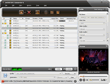
ImTOO DAT Converter is a simple-to-use DAT video converting software that can convert DAT to AVI, DivX, MP4, MPEG-1/2/4, WMV, 3GP and FLV video, and convert DAT to MP3 and M4A audio.
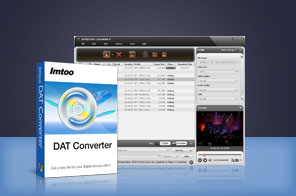


- ImTOO DAT Converter features a fast DAT to AVI conversion, which helps you convert DAT files to AVI, MPEG-1/2/4, DivX, MP4, WMV, 3GP and FLV videos. And It makes it easy to extract audio from DAT video file and save as MP3 and M4A audio files.
- In addition to convert DAT files, ImTOO DAT Converter also assists you to convert any DAT video segment, adjust video and audio parameters, customize file size, split file and more.

Main Functions
 Efficient DAT Video Converter
Easily convert DAT to AVI, MPEG-1/2/4, DivX, MP4, WMV, 3GP and FLV videos. Stable to Audio ConversionExtract audio from MPG, MPEG, MPA, DAT and VOB video, then convert to MP3 and M4A.
 Super Fast DAT Conversion Speed
High conversion speed offered as it fully supports multi-core CPU that ensures the full use of your CPU.
What's new
- Optimized the profile parameters of GPU acceleration.
- Supports profile parameters: Main, Baseline and High.
- Supports preset parameters: Ultrafast, Superfast, Veryfast, Faster, Fast, Medium, Slow, Slower.
- Supports adding cover when output to M4A formats.
- Fixed bugs.
- Supports AMD APP encoding technology
- Makes the built-in player resizable
- Switches the zoom mode between 4:3 and 16:9
- Classifies the profile settings into different types
- Adds the function of power management
Key Features
- Convert more than one file in batch mode at a time with only one click.
- Enables you to convert DAT videos at 5x faster speed with NVIDIA CUDA & AMD APP technology.
- Help you split a large file into several files in smaller size by the specified split time or file size.
- Easy to convert desired video clip from the original video. You can define the start time and duration.
- Detailed video and audio parameters available to customize, such as bit rate, frame rate, sample rate, codec, quality.
- Add multiple profiles for one DAT file and output them at a time, rather than only one profile for one source.
- The Bitrate Calculator helps you get the output file size you want and the bit rate can be calculated instantly.
- ImTOO DAT Converter provides several after-done actions: exit, hibernate, standby, shutdown. So you have no need to wait at your computer.
- The video conversion can be finished in the background so that you can run other program at the same time.
- Capture the movie images you like while previewing video in the built-in resizable player and save them as JPG, PNG, GIF, or BMP format.
- Offers the function of power management.
User Reviews
"This DAT converter software is affordable for me! And it is worth buying. It's easy to use and fast. Now I can watch the dat files on my portable players!" David King, USA


-
- iTransfer Platinum Mac

- iPhone Transfer Platinum Mac
- iPad Mate Platinum Mac

- PodWorks Platinum Mac
- iPhone Ringtone Maker Mac
- iPhone Transfer Plus Mac
- iPad Mate for Mac
- PodWorks for Mac
- iPhone Contacts Transfer Mac
- DVD to Video for Mac
- DVD to MP4 Converter for Mac
- DVD to iPhone Converter for Mac
- Blu-ray to Video Converter for Mac
- DVD to iPad Converter for Mac
- DVD to Audio Converter for Mac
- DVD Creator for Mac
- Video Converter for Mac
- MP4 Converter for Mac
- 3D Movie Converter Mac
- Video Editor 2 for Mac
- Audio Converter Pro Mac
- YouTube Video Converter for Mac
- Download YouTube Video for Mac
- YouTube HD Video Downloader Mac
- YouTube to iTunes Converter Mac

- YouTube to iPhone Converter Mac
- HEVC/H.265 Converter for Mac
- iTransfer Platinum Mac
- More