


ImTOO DVD to DivX Converter
 Now 5X Faster
Update: Nov 16, 2021
ImTOO DVD to DivX Converter is a comprehensive DVD to DivX/XviD converting software, which can convert home DVD to DivX, AVI, XviD video with high quality. All the output movies are playable on Archos, iRiver PMP, Creative Zen and other portable devices. Free download and try now!
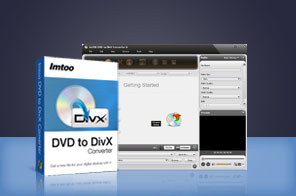


- ImTOO Home DVD to DivX Converter offers you an easy way to convert home DVD to DivX, DVD to XviD and DVD to AVI video format, and put Home DVD movies on portable player.
- Meanwhile, it provides many features to customize, e.g. convert a certain clip of DVD, select target subtitle and audio, split file, adjust video and audio parameters like bit rate, etc.
- The Home DVD to DivX converter allows you to convert Home DVD to DivX format directly for popular portable players like Archos, iRiver PMP, Creative Zen, etc. Just a few clicks are enough to make the conversion easy and fast!
- Can't rip/convert DVD with copyright
Main Functions
 DVD to DivX converterConvert DVD to DivX video (AVI) format with high quality.
 DVD to AVI converterConvert any DVD movies to AVI, XviD; copy and backup your DVD movies to your hard disk.
 High DVD converting speedDetect your CPU type automatically and provide the highest converting speed with support for multi-core CPU.
 Batch conversionAble to convert two or more DVD files to DivX videos with only one click in batch conversion mode.
What's new
- Fully support iPhone 5, iPad mini and iPad 4.
- Optimized the profile parameters of GPU acceleration.
- Supports profile parameters: Main, Baseline and High.
- Supports preset parameters: Ultrafast, Superfast, Veryfast, Faster, Fast, Medium, Slow, Slower.
- Supports adding cover when output to M4A formats.
- Fixed bugs.
- Adopts multi-thread encoding technology which promotes the converting speed of High Definition videos.
- Lyric support for MP3 format music.
- Metadata support for MP4 and M4A formats.
- Makes the built-in player resizable;
- Switch the zoom mode between 4:3 and 16:9;
- Classifies the profile settings into different types;
- Added the function of power management.
Key Features
- Get DVD disc info from Internet automatically including director, film name, actors/actresses, and year.
- Set the start time and duration of a segment to convert; split one large DVD file into several smaller files.
- With Bitrate Calculator, you can specify the output file size you need with the bit rate calculated at once.
- Clone DVD title or add diverse profiles for one original to convert the copies only once at the same time.
- Not only the default but more settings to customize: bit rate, resolution, frame rate, sample rate, codec.
- Running it in the background to finish conversion will save much resource.
- Preview any titles before conversion and take a snapshot to save the captured pictures as JPG, GIF, PNG, BMP with the built-in resizable player.
- Offer after-done actions to automatically shutdown, exit, standby, or hibernate after the conversion.
- Support various video aspect ratios: 4:3 and 16:9, multi-language interfaces and sound normalization.
- Able to manager your system power.
- Available in English, French, German, Japanese, Spanish and Chinese interface languages.
User Reviews
"Having tried many DVD to DivX converters (including the ones CNET liked), this one actually works, and has many terrific features. And the support staff is very friendly and helpful. you cannot find this on any other DVD to DivX converting software."Edward M, US"I'd like to convert DVD to DivX for my Creative Zen. I tried the demo model and it is better than most other dvd Converters I have tried." Ingrid N, Australia


-
- iTransfer Platinum Mac

- iPhone Transfer Platinum Mac
- iPad Mate Platinum Mac

- PodWorks Platinum Mac
- iPhone Ringtone Maker Mac
- iPhone Transfer Plus Mac
- iPad Mate for Mac
- PodWorks for Mac
- iPhone Contacts Transfer Mac
- DVD to Video for Mac
- DVD to MP4 Converter for Mac
- DVD to iPhone Converter for Mac
- Blu-ray to Video Converter for Mac
- DVD to iPad Converter for Mac
- DVD to Audio Converter for Mac
- DVD Creator for Mac
- Video Converter for Mac
- MP4 Converter for Mac
- 3D Movie Converter Mac
- Video Editor 2 for Mac
- Audio Converter Pro Mac
- YouTube Video Converter for Mac
- Download YouTube Video for Mac
- YouTube HD Video Downloader Mac
- YouTube to iTunes Converter Mac

- YouTube to iPhone Converter Mac
- HEVC/H.265 Converter for Mac
- iTransfer Platinum Mac
- More