


ImTOO DVD to WMV Converter

Update: Nov 16, 2021
ImTOO DVD to WMV Converter is a powerful WMV converter to convert home DVD to WMV and WMA easily and fast with outstanding image and sound quality. This DVD to WMV converter is the best solution to copy DVD to computer in WMV video format and WMA audio format file playable on so many WMV players like Pocket PC, Xbox 360, Creative Zen, Zune.
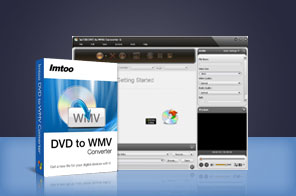


- ImTOO Home DVD to WMV Converter is an easy-to-use DVD to WMV converter and DVD to WMA converter which helps you convert Home DVD to WMV video, backup Home DVD to high quality file of WMV and extract audio from Home DVD to WMA file at high speed.
- Unlike other Home DVD to WMV converters, there are rich options you can customize in ImTOO Home DVD to WMV Converter, e.g. adjust video size, convert home DVD's any segment to WMV, select target subtitle and audio.
- So simple that with just a few clicks, the problem of how to convert Home DVD to WMV video won't bother you anymore. Just feel free to download ImTOO Home DVD to WMV Converter and enjoy WMV videos on Pocket PC, Xbox 360, Creative Zen, Zune and other players!
- Can't rip/convert DVD with copyright
Main Functions
 DVD to WMV converter
Convert DVD to WMV video format for Pocket PC, Xbox 360, Zune. DVD to WMA converter
Convert any movie DVD and music DVD to WMA audio format; extract music from DVD movie. High speed with multi-core CPU
Fully support dual-core and multi-core CPU, and convert DVD to WMV and WMA with great stability and super fast speed. Batch file conversion
Able to convert multiple files to WMV or WMA at the same time with batch conversion applied.
What's new
- Fully support iPhone 5, iPad mini and iPad 4.
- Adopts multi-thread encoding technology which promotes the converting speed of High Definition videos.
- Makes the built-in player resizable;
- Switch the zoom mode between 4:3 and 16:9;
- Classifies the profile settings into different types;
- Added the function of power management.
Key Features
- High compatibility with various WMV players including Pocket PC, Xbox 360, Creative Zen, Zune.
- Automatically read DVD disc info and retrieve online including studio, actors/actresses, director.
- Convert a desired part of the DVD movie file by specifying the start time and duration of a segment.
- Split one file into several smaller WMV file by the specified file size or time length to fit your WMV player better.
- Customize the output file size in Bitrate Calculator; save the changed parameters as your own profile.
- Let you adjust output settings like bit rate, frame rate, sample rate, codec, channel to get desired results.
- To get many files in the same content, you can clone title or add multiple files for one source to convert at a time.
- Run the software in the background to save resource; auto shut down computer to conserve your power.
- Capture favorite images from DVD movies when previewing and save them as JPG, PNG, GIF, BMP files.
- The built-in player is resizable, and can be used as a stand-alone player.
- Interface available in 6 different languages (English, French, German, Japanese, Spanish and Chinese).
- Able to manager your system power.
User Reviews
"I have been looking for a way to Convert DVD movie clips into WMV video files and this DVD to WMV converter easily do the trick." Gary U, UK "Ease of use. I was looking for DVD to WMV convertingsoftware that would easily convert a DVD movie into WMV files... yours did it!!! Way to go! "Paul B, US


-
- iTransfer Platinum Mac

- iPhone Transfer Platinum Mac
- iPad Mate Platinum Mac

- PodWorks Platinum Mac
- iPhone Ringtone Maker Mac
- iPhone Transfer Plus Mac
- iPad Mate for Mac
- PodWorks for Mac
- iPhone Contacts Transfer Mac
- DVD to Video for Mac
- DVD to MP4 Converter for Mac
- DVD to iPhone Converter for Mac
- Blu-ray to Video Converter for Mac
- DVD to iPad Converter for Mac
- DVD to Audio Converter for Mac
- DVD Creator for Mac
- Video Converter for Mac
- MP4 Converter for Mac
- 3D Movie Converter Mac
- Video Editor 2 for Mac
- Audio Converter Pro Mac
- YouTube Video Converter for Mac
- Download YouTube Video for Mac
- YouTube HD Video Downloader Mac
- YouTube to iTunes Converter Mac

- YouTube to iPhone Converter Mac
- HEVC/H.265 Converter for Mac
- iTransfer Platinum Mac
- More