


ImTOO iPad to Mac Transfer

Update: Jan 10, 2024
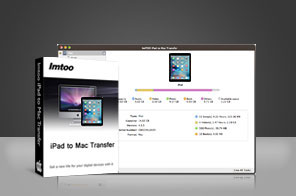




- Transfer apps, video and audio files from iPad and pictures/videos recorded by device to Mac for your backup
- Also back up iPad movies, music and pictures/videos recorded by device to iTunes library and also back up iPhone SMS messages to your Mac
- Transfer apps/videos/music/photos on your Mac to iPad without iTunes
- Create, delete and edit photo albums while iTunes cannot
- Apply to all iPad/iPhone/iPod models, iOS 17 and iTunes 12

Still bothering about iTunes' inability of taking out your iPad music and videos? Now with ImTOO iPad to Mac Transfer, you won't have such worries anymore. This iPad to Mac transfer tool not only synchronizes files on your Mac to iPad like iTunes, but it also supports file backup from your iPad to Mac and iPad to iTunes and even export pictures/videos recorded by device to Mac/iTunes.
ImTOO iPad to Mac Transfer is applicable to all iPad/iPhone/iPod models, incl. iPad, iPad 2, iPad 3, iPad 4, iPad mini, iPad mini 2, iPad mini 3, iPad mini 4, iPad Air, iPad Air 2, iPad Pro, iPod, nano (5th Gen), iPod mini, iPod shuffle, iPod classic, iPod touch, iPod touch 4, iPod touch 5, iPod touch 6, iPhone, iPhone 3G, iPhone 3GS, iPhone 4, CDMA iPhone 4, iPhone 5, iPhone 5S, iPhone 5C, iPhone 6, iPhone 6 Plus, iPhone 6S, iPhone 6S Plus. To find more fun of your iPad, download ImTOO iPad to Mac Transfer for a free trial now!

Main Functions
 iPad to Mac Transfer
Copy video and music files from iPad to your Mac for backup, read and export pictures/videos recorded by device to Mac. Now apps transferring is supported, too. You can also manage documents for some apps. Mac to iPad Transfer
Transfer apps, movies, music and photos from your Mac to iPad without iTunes. iPad to iTunes Transfer
Even export iPad videos/music/pictures and videos recorded by device to iTunes library for protecting your media files from loss.
What's new
- Fully compatible with iOS 17, iPhone 15, iPhone 15 Plus, iPhone 15 Pro, iPhone 15 Pro Max
- Fully support iOS 6, iTunes 11.0 and iPhone 5, iPad 4, iPad mini, iPod touch 5, iPod nano 7
- Transfer apps and manage app documents
- Back up SMS messages
- Transfer files via Wi-Fi
- Copy playlist to iTunes newly
- Multiple view types to show music, movies and photos
- Customize column to show file details and add hotkeys in the menu
- Optimized function of modifying ID3 info
- Add eBook management feature
- Add iPhone ringtone management feature
- Support multiple iOS devices simultaneously
- Read and export pictures and videos recorded by the device
- Directly preview the device’s videos, music and other files less than 8MB on the computer
- Added photo album function
Key Features
- Provide you with Quick Search and Filter tools to find iPad files you want quickly.
- Edit music file information (incl. name, artist, album, composer, and year) to make your iPad music files more organized.
- Create your playlists to your habits, and edit or delete or copy iPad playlists easily.
- Establish, remove and rename photo albums to manage and organize your iPad photos conveniently.
- Transfer iPhone ringtones and PDF/EPUB books from Mac to devices and manage them according to actual need.
- You can also import one photo into different albums for different usages.
- Support app transfer and app document management.
- Allow you to view your iPad files in multiple modes including songs, artists, albums and genres, and even add illustrations to iPad video and music files in thumbnails mode.
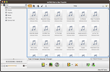
- Automatically detect your iPad and displays its information including model, capacity (used and available space), version, serial number and format on the main interface for your reference.
- Accept all iPad/iPhone/iPod models including iPad, iPad mini, iPad Air, iPad Pro (12.9/9.7/10.5/11 inch), iPod nano/mini/shuffle/classic/touch, iPhone 3G/3GS/4/5/5S/5C/SE/6/6S/7/8/X/XS/XR/11/12/13/14/15 Series.
- File transfer between iPad, iTunes and Mac with this iPad Transfer for Mac can be finished rapidly.
- Support multiple iOS devices simultaneously.
- Interface languages include English, Italian, Spanish, German, French, Simplified Chinese, Traditional Chinese and Japanese.
User Reviews
"It’s really easy to use, and it helped I reinstalled my computer. I just had to plug in my iPad in after installing this iPad to Mac Transfer and it worked perfectly."Roy ,US


-
- iTransfer Platinum Mac

- iPhone Transfer Platinum Mac
- iPad Mate Platinum Mac

- PodWorks Platinum Mac
- iPhone Ringtone Maker Mac
- iPhone Transfer Plus Mac
- iPad Mate for Mac
- PodWorks for Mac
- iPhone Contacts Transfer Mac
- DVD to Video for Mac
- DVD to MP4 Converter for Mac
- DVD to iPhone Converter for Mac
- Blu-ray to Video Converter for Mac
- DVD to iPad Converter for Mac
- DVD to Audio Converter for Mac
- DVD Creator for Mac
- Video Converter for Mac
- MP4 Converter for Mac
- 3D Movie Converter Mac
- Video Editor 2 for Mac
- Audio Converter Pro Mac
- YouTube Video Converter for Mac
- Download YouTube Video for Mac
- YouTube HD Video Downloader Mac
- YouTube to iTunes Converter Mac

- YouTube to iPhone Converter Mac
- HEVC/H.265 Converter for Mac
- iTransfer Platinum Mac
- More