




-
- iTransfer Platinum Mac

- iPhone Transfer Platinum Mac
- iPad Mate Platinum Mac

- PodWorks Platinum Mac
- iPhone Ringtone Maker Mac
- iPhone Transfer Plus Mac
- iPad Mate for Mac
- PodWorks for Mac
- iPhone Contacts Transfer Mac
- DVD to Video for Mac
- DVD to MP4 Converter for Mac
- DVD to iPhone Converter for Mac
- Blu-ray to Video Converter for Mac
- DVD to iPad Converter for Mac
- DVD to Audio Converter for Mac
- DVD Creator for Mac
- Video Converter for Mac
- MP4 Converter for Mac
- 3D Movie Converter Mac
- Video Editor 2 for Mac
- Audio Converter Pro Mac
- YouTube Video Converter for Mac
- Download YouTube Video for Mac
- YouTube HD Video Downloader Mac
- YouTube to iTunes Converter Mac

- YouTube to iPhone Converter Mac
- HEVC/H.265 Converter for Mac
- iTransfer Platinum Mac
- More
How to convert WMV to iPod Video? 

Here we'd like to show you a simple way to play Windows Media Video (.wmv) videos on your iPod. You will find watching WMV videos on your iPod is so easy.
To put .wmv videos on iPod, we should convert WMV files to iPod compatible format videos, and you can transfer the converted files on iPod directly without iTunes.
Tools required:
Step-by-step Guide: How to convert WMV to iPod video
Step 1: Add your WMV(.wmv) videos into the program.
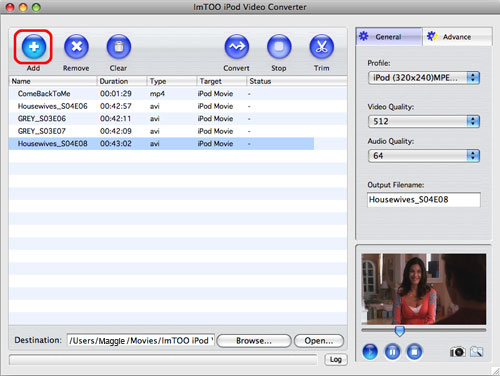
Step 2: Output settings.
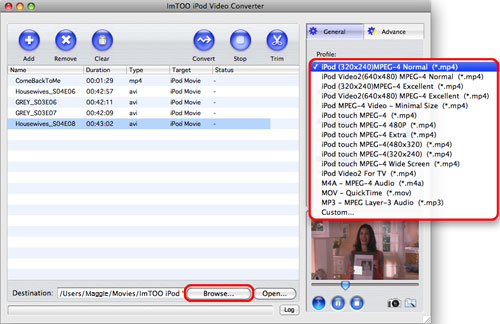
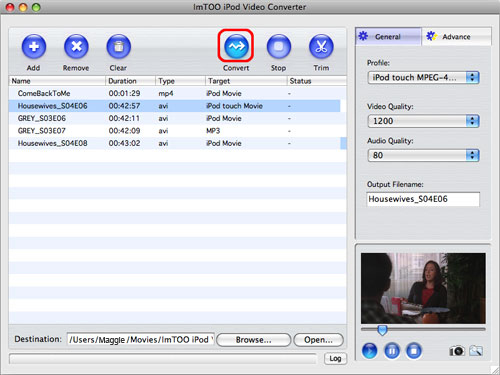
Choose an iPod profile as your output file format.
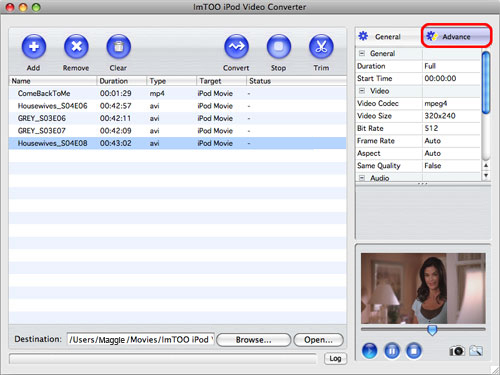
Reset detailed parameters: Click "Advance" button to reset more detailed video and audio parameters.
Click "Browse..." button to choose output folder for saving your converted iPod video files.
Step 3: Convert.
Click "Convert Checked Item(s)" button on the main interface to start your conversion.
OK, done.