



-
- iTransfer Platinum Mac

- iPhone Transfer Platinum Mac
- iPad Mate Platinum Mac

- PodWorks Platinum Mac
- iPhone Ringtone Maker Mac
- iPhone Transfer Plus Mac
- iPad Mate for Mac
- PodWorks for Mac
- iPhone Contacts Transfer Mac
- DVD to Video for Mac
- DVD to MP4 Converter for Mac
- DVD to iPhone Converter for Mac
- Blu-ray to Video Converter for Mac
- DVD to iPad Converter for Mac
- DVD to Audio Converter for Mac
- DVD Creator for Mac
- Video Converter for Mac
- MP4 Converter for Mac
- 3D Movie Converter Mac
- Video Editor 2 for Mac
- Audio Converter Pro Mac
- YouTube Video Converter for Mac
- Download YouTube Video for Mac
- YouTube HD Video Downloader Mac
- YouTube to iTunes Converter Mac

- YouTube to iPhone Converter Mac
- HEVC/H.265 Converter for Mac
- iTransfer Platinum Mac
- More
The Best Way to Convert DVD to iPod

This document will show you how to convert DVD movie to format and the easy way to put DVD on . After these jobs, you can watch the DVD movie on the.
Page 3 Of 3
- You can play the output mp4 file on your PC with QuickTime. But how to put them into for playback? The latest version of our software has integrated Video Manager, offered by www.sharewareguide.net, which will be found in the “Tool” menu.
Please get your connected with PC first, and then run Video Manager from the “Tool” menu. The program will detect “C:Temp” automatically and show the files in this folder on the left; the files on the will be shown on the right, shown as “Removable Disk”.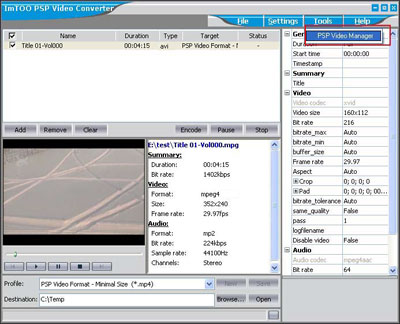
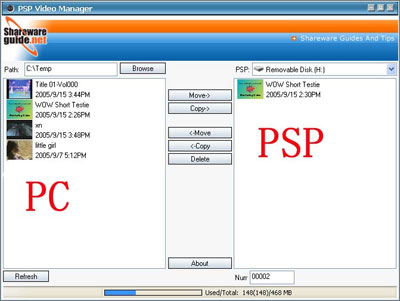
- Please highlight the file which you want to put into the and then click “Copy->”. The file will be transferred into .
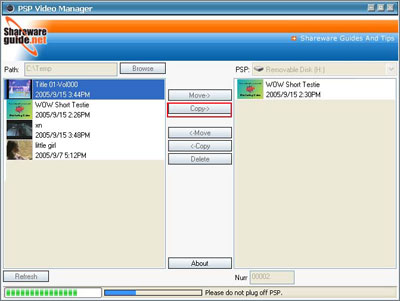
- After this step, you will see your file on the right, which means that the file is playable on the now.