


ImTOO RMVB Converter
 Now 5X Faster
Update: Nov 16, 2021
ImTOO RMVB Converter is especially designed for converting Real Media videos to other video files like convert RMVB to AVI, MP4, MPEG, WMV, DivX. Aside from this, this professional RMVB converter can also extract RA audios solely from RMVB, RM, YUV video files.
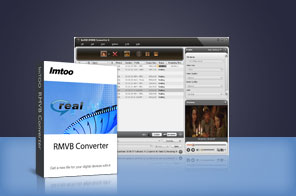


- An easy-to-use but multifunctional RMVB to AVI converter and RMVB to MP4 converter tool converts Real Media (RM, RMVB) to AVI, MP4, MPEG, DivX, WMV videos and extract RA audio from RMVB video.
- With ImTOO RMVB Converter, you can split a large file into several ones, extract any segment for converting, specify the output file size exactly you want with Bitrate Calculator, and then convert to AVI, MP4, etc. video file at high speed.
- Multi-core CPU support, multithreading and batch conversion make ImTOO RMVB Converter a must-have tool for those with a large collection of RMVB videos.
Main Functions
 RMVB to AVI MP4 ConverterConvert RMVB to AVI, DivX, MP4, MPEG1, MPEG2, MPEG4/H.264, VOB, XviD, WMV, 3GPP, 3GPP2 video.
 Other Video to AVI MPEG ConverterConvert other video files like FLV, MKV, MPG, MPEG, MPA, DAT, VOB, MP4, WMV, ASF to above videos.
 RMVB to RA ConverterExtract RA from RMVB/RM, as well as convert FLV, MKV, MPG, MPEG, MPA, DAT, VOB, MP4, WMV, ASF to RA.
 Multi-core for One TaskThe conversion speed will be increased with your core number. Processing each task on multi-core makes the whole conversion faster and more efficient.
What's new
- Fully compatible with iOS 17, iPhone 15, iPhone 15 Plus, iPhone 15 Pro, iPhone 15 Pro Max
- Fully support iPhone 6, iPhone 6 Plus
- Fully support iPhone 5, iPad mini and iPad 4.
- Optimized the profile parameters of GPU acceleration.
- Supports profile parameters: Main, Baseline and High.
- Supports preset parameters: Ultrafast, Superfast, Veryfast, Faster, Fast, Medium, Slow, Slower.
- Fixed bugs.
- Supports AMD APP encoding technology
- Makes the built-in player resizable
- Switches the zoom mode between 4:3 and 16:9
- Classifies the profile settings into different types
- Adds the function of power management
Key Features
- Increase RMVB video conversion speed up to 5X with NVIDIA CUDA & AMD APP encoding technology.
- Adjustable aspect ratio (4:3 and 16:9), power management, resizable player are available.
- The profile settings are classified by different types.
- Batch conversion and multithreading are supported, so you can convert a batch of files at one time.
- Specify the start time and duration of the segment you want to extract it from RM/RMVB files.
- Split a large file into several ones by predefined or self-defined split time or size.
- Enter the output file size you want in the Bitrate Calculator tool and get corresponding video bit rate instantly.
- Convert one file to multiple files with the same content but different formats at one time. This saves time greatly.
- A variety of profile parameters can be adjusted like quality, resolution, bit rate, codec, and so on. You can save the modified parameters as a new profile of your own.
- Run ImTOO RMVB Converter in the background to spare CPU resource for other running applications.
- Set the after done action as quit, shut down, hibernate or standby, to let the program perform this action automatically.
- Check for software updates automatically and periodically.
- Preview any input file before conversion and take a snapshot of favorite video images anytime during preview.

User Reviews
"Thank you for your recommendation. Just downloaded and tried it. Works great for me. Now, I'd like to get the full version. Thanks again!" Angelina, USA


-
- iTransfer Platinum Mac

- iPhone Transfer Platinum Mac
- iPad Mate Platinum Mac

- PodWorks Platinum Mac
- iPhone Ringtone Maker Mac
- iPhone Transfer Plus Mac
- iPad Mate for Mac
- PodWorks for Mac
- iPhone Contacts Transfer Mac
- DVD to Video for Mac
- DVD to MP4 Converter for Mac
- DVD to iPhone Converter for Mac
- Blu-ray to Video Converter for Mac
- DVD to iPad Converter for Mac
- DVD to Audio Converter for Mac
- DVD Creator for Mac
- Video Converter for Mac
- MP4 Converter for Mac
- 3D Movie Converter Mac
- Video Editor 2 for Mac
- Audio Converter Pro Mac
- YouTube Video Converter for Mac
- Download YouTube Video for Mac
- YouTube HD Video Downloader Mac
- YouTube to iTunes Converter Mac

- YouTube to iPhone Converter Mac
- HEVC/H.265 Converter for Mac
- iTransfer Platinum Mac
- More