


ImTOO Convert PowerPoint to YouTube

Update: Nov 16, 2021
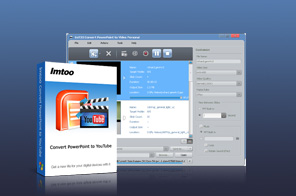


- Convert PowerPoint presentations (PPTs) to YouTube videos (H.264/MPEG4-AVC, WMV, HD-H.264, HD-WMV) with the optimized parameters
- Share PPTs on YouTube in full-HD 1080p resolution
- Add commentaries, watermarks & music
- Supports high-speed batch PPT to YouTube video conversion
- Create custom YouTube video presentations
- Fully compatible with all PowerPoint files
Searching for a quick and easy way to share all your PPTs on YouTube and other video sharing sites? ImTOO Convert PowerPoint to YouTube allows you to convert PPTs to standard/high-definition (SD/HD) videos in H.264/MPEG4-AVC, WMV, HD-H.264, or HD-WMV format, so you can upload, view and share them on websites such as YouTube.com in various resolutions (320×240, 480×360, 640×480, 1280×720, 1920×1080) without installing Microsoft PowerPoint.
In addition to PPT to YouTube conversion, you can also use this PowerPoint to YouTube converter to create custom YouTube presentations: rehearse and record commentary, add background music, attach trademarks/logos, adjust output parameters, set the slide transition interval, or remove all original slide animations and effects. Download ImTOO Convert PowerPoint to YouTube now for FREE!
Main Functions
 Convert PowerPoint to YouTube
Convert PPTs to YouTube videos (H.264/MPEG4-AVC, WMV, HD-H.264, HD-WMV) with the optimized parameters, which assure you of the best result on YouTube and make them uploadable to YouTube and other video sharing sites. Practice Presentation, Record Commentary, Add Background Music
Practice your presentation first, then once satisfied, record your own commentary. You can also add a music clip to the final presentation. Attach Label to Presentation
Include your own label or logo in the final presentation to prevent it from illegal use or distribution. Convert PPT to YouTube Video the "Express" Way
Sacrifice slide features for speed with "Express Convert" - maximize the PPT to YouTube conversion process by removing all animations and effects from the source PPT file.
Key Features
- Convert multiple PPT files to YouTube videos at once for increased efficiency.
- Adjust parameters and settings such as the video quality, resolution, frame rate, slide playback interval and so on to custom your YouTube video outputs.
- Keeps all original slide features after conversion.
- Auto-exit application, hibernate, stand by, shut down system, or do nothing upon completion of all tasks.
- Supports all PowerPoint file types (ppt, pptx, pptm, ppsx, pps, ppsm, potx, potm, pot) and all PowerPoint versions.
- Two modes of viewing presentation slides: List and Thumbnail
- Preview presentation and check the final effects prior to conversion.
- Multilingual (English, German, French, Chinese, Japanese) and multi-skin interface.
User Reviews
"This program is so cool! I can upload all my PPT files on YouTube.com and share them with my classmates."Zayden, US


-
- iTransfer Platinum Mac

- iPhone Transfer Platinum Mac
- iPad Mate Platinum Mac

- PodWorks Platinum Mac
- iPhone Ringtone Maker Mac
- iPhone Transfer Plus Mac
- iPad Mate for Mac
- PodWorks for Mac
- iPhone Contacts Transfer Mac
- DVD to Video for Mac
- DVD to MP4 Converter for Mac
- DVD to iPhone Converter for Mac
- Blu-ray to Video Converter for Mac
- DVD to iPad Converter for Mac
- DVD to Audio Converter for Mac
- DVD Creator for Mac
- Video Converter for Mac
- MP4 Converter for Mac
- 3D Movie Converter Mac
- Video Editor 2 for Mac
- Audio Converter Pro Mac
- YouTube Video Converter for Mac
- Download YouTube Video for Mac
- YouTube HD Video Downloader Mac
- YouTube to iTunes Converter Mac

- YouTube to iPhone Converter Mac
- HEVC/H.265 Converter for Mac
- iTransfer Platinum Mac
- More