



-
- iTransfer Platinum Mac

- iPhone Transfer Platinum Mac
- iPad Mate Platinum Mac

- PodWorks Platinum Mac
- iPhone Ringtone Maker Mac
- iPhone Transfer Plus Mac
- iPad Mate for Mac
- PodWorks for Mac
- iPhone Contacts Transfer Mac
- DVD to Video for Mac
- DVD to MP4 Converter for Mac
- DVD to iPhone Converter for Mac
- Blu-ray to Video Converter for Mac
- DVD to iPad Converter for Mac
- DVD to Audio Converter for Mac
- DVD Creator for Mac
- Video Converter for Mac
- MP4 Converter for Mac
- 3D Movie Converter Mac
- Video Editor 2 for Mac
- Audio Converter Pro Mac
- YouTube Video Converter for Mac
- Download YouTube Video for Mac
- YouTube HD Video Downloader Mac
- YouTube to iTunes Converter Mac

- YouTube to iPhone Converter Mac
- HEVC/H.265 Converter for Mac
- iTransfer Platinum Mac
- More
How to convert VOB to WMV, AVI? 

I have a colletion of DVDs with classic film. In case of that the DVD disk is scratched ,I want to convert the VOB files from DVD to WMV or AVI on computer. Is there any program can help me do it ? Now you are in the right place,ImTOO DVD to Video Ultimate not only can help you convert VOB to almost all popular video formats such as VCD, SVCD, WMV, ASF,WMA, DivX, MPEG1, MPEG2, MPEG4, Xvid and AVI etc.but also can merge and clip video. This step-by-step guide will show you how to convert VOB to WMV, AVI etc. video formats with excellent image and sound quality.
Functions of ImTOO DVD to Video Ultimate:
- DVD to Video Expert - Convert DVD movies to AVI, H.264/AVC, FLV, WMV, MP4, MPEG, RM, MOV, XviD, 3GP, VOB, ASF, DV and many others.
- High-Definition (HD) DVD to Video - Convert DVD movies to HD AVI, HD MPEG-2/4, HD H.264/MPEG-4 AVC, HD WMV, HD Quick Time, HD VOB, HD ASF videos, and other HD video formats.
- DVD to Audio Converter - Extract audio from DVD movies and convert DVD audio to MP3, WMA, WAV, RA, M4A, AAC, AC3, OGG, MP2 or any other popular audio format.
- DVD to iPad/iPod/iPhone Converter - Convert DVD movies to iPad, iPod and iPhone etc..
- Clip, Merge and Split Videos - Clip segments from a DVD title/chapter; merge several titles/chapters into one with added transitions; split a title/chapter into segments.
Tools Required:
- DVD to Video for Windows or DVD to Video for Mac
- Blank DVD Disc
Step-by-step Guide: How to convert DVD to AVI, convert DVD to PC and convert DVD VOB format to WMV,AVI?
Step 1: Free download ImTOO DVD to Video Ultimate and run it.
Step 2: Launch ImTOO DVD to Video Ultimate and the clear interface is as follows:
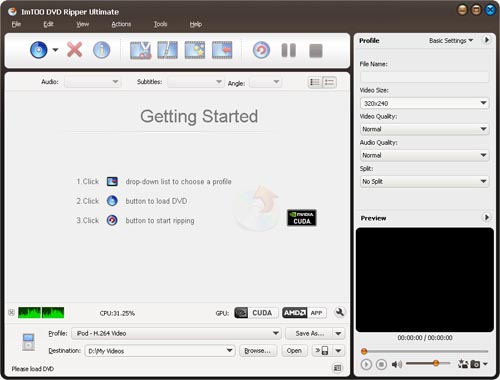
Step 3: Insert DVD disc and click "Profile" combo-box to choose "WMV" or "AVI" as your output format.
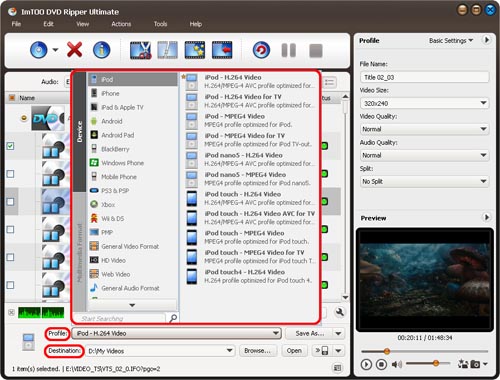
Step 4: Click DVD button to open DVD
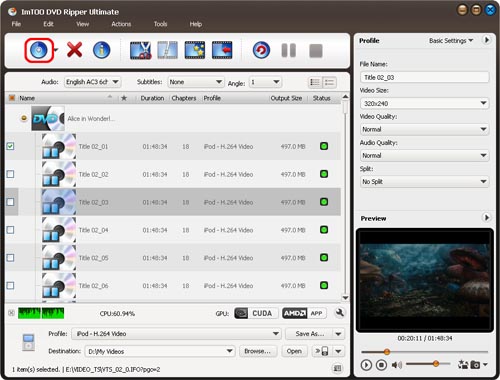
Step 5: Click Browse botton to select output path.
Step 6: Click Convert button to start converting DVD to PC hard drive
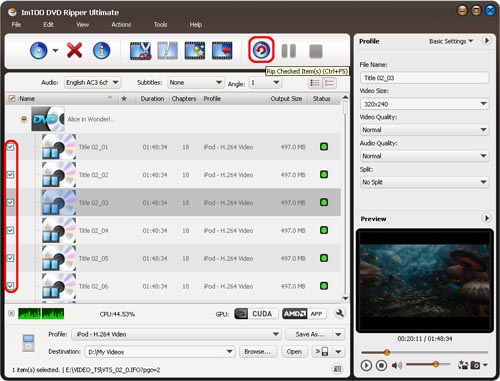
OK. You complete successfully to convert DVD to hard drive and convert VOB file to WMV, AVI.