


ImTOO FLV to 3GP Converter
 Now 5X Faster
Update: Nov 16, 2021
ImTOO FLV to 3GP Converter is an easy-to-use FLV video conversion tool that helps you convert FLV to 3GP, FLV to 3G2 for playback on your 3GP mobile phone, such as Nokia, Motorola, Samsung, Sony Ericsson and other mobile phones.
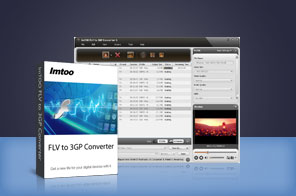


- ImTOO FLV to 3GP Converter enables you to convert FLV to 3GP and 3G2 videos easily, which ensures the great playback of the output 3GP files on your Motorola, Nokia, Samsung, Sony Ericsson and other 3GP phones.
- ImTOO FLV to 3GP Converter is also a splitter and editor, which helps you split file, convert any segment, customize file size, and adjust parameters.
Main Functions
 FLV to 3GP converter
Convert FLV to 3GP mobile phone video format. Fast Speed and High Quality
It completely supports multi-core CPU that ensures the full use of your CPU to provide the highest conversion speed. Batch Conversion
Convert multiple FLV video files to 3GP/3G2 videos in batches at once.
What's new
- Makes the built-in player resizable
- Switches the zoom mode between 4:3 and 16:9
- Classifies the profile settings into different types
- Adds the function of power management
Key Features
- Adjustable aspect ratio (4:3 and 16:9), power management and resizable player are available.
- The profile settings are sorted by different types.
- The output files can be smoothly played on Nokia, Motorola, Samsung, Sony Ericsson, and other 3GP phones.
- Split the file into several video clips. You can customize the split time or file size.
- Any favorite clip from your FLV video can be selected to convert and saved as 3GP format to fit your 3GP player.
- Advanced output settings that allow you to set bit rate, frame rate, sample rate, codec, and resolution.
- "Add Profiles" function means you can output more than one file at a time for one source FLV file.
- The Bitrate Calculator lets you get the output file size you want. The video bit rate will be calculated instantly.
- Automatically shut down your computer, exit, standby or hibernate after the conversion is finished.
- ImTOO FLV to 3GP Converter can can finish the conversion task in the background so that you can run other programs at the same time.
- Capture movie images while previewing with size-adjustable player and save the captured images as JPG, PNG, GIF, and BMP files.
User Reviews
"I just purchased your FLV to 3GP Converter and I just want to say you guys have made a great product. It looks like I'm losing no picture quality in going from FLV to 3GP. Thanks for this program, I would recommend it to anyone." Daniel Remborn Kruse, USA


-
- iTransfer Platinum Mac

- iPhone Transfer Platinum Mac
- iPad Mate Platinum Mac

- PodWorks Platinum Mac
- iPhone Ringtone Maker Mac
- iPhone Transfer Plus Mac
- iPad Mate for Mac
- PodWorks for Mac
- iPhone Contacts Transfer Mac
- DVD to Video for Mac
- DVD to MP4 Converter for Mac
- DVD to iPhone Converter for Mac
- Blu-ray to Video Converter for Mac
- DVD to iPad Converter for Mac
- DVD to Audio Converter for Mac
- DVD Creator for Mac
- Video Converter for Mac
- MP4 Converter for Mac
- 3D Movie Converter Mac
- Video Editor 2 for Mac
- Audio Converter Pro Mac
- YouTube Video Converter for Mac
- Download YouTube Video for Mac
- YouTube HD Video Downloader Mac
- YouTube to iTunes Converter Mac

- YouTube to iPhone Converter Mac
- HEVC/H.265 Converter for Mac
- iTransfer Platinum Mac
- More