




-
- iTransfer Platinum Mac

- iPhone Transfer Platinum Mac
- iPad Mate Platinum Mac

- PodWorks Platinum Mac
- iPhone Ringtone Maker Mac
- iPhone Transfer Plus Mac
- iPad Mate for Mac
- PodWorks for Mac
- iPhone Contacts Transfer Mac
- DVD to Video for Mac
- DVD to MP4 Converter for Mac
- DVD to iPhone Converter for Mac
- Blu-ray to Video Converter for Mac
- DVD to iPad Converter for Mac
- DVD to Audio Converter for Mac
- DVD Creator for Mac
- Video Converter for Mac
- MP4 Converter for Mac
- 3D Movie Converter Mac
- Video Editor 2 for Mac
- Audio Converter Pro Mac
- YouTube Video Converter for Mac
- Download YouTube Video for Mac
- YouTube HD Video Downloader Mac
- YouTube to iTunes Converter Mac

- YouTube to iPhone Converter Mac
- HEVC/H.265 Converter for Mac
- iTransfer Platinum Mac
- More
How to convert music file such as WAV, WMA, M4A to MP3 format? 

My good friend shares me a lot of wonderful music with OGG, APE or FLAC formats. And I want to license this music on iPhone, but that formats are incompatible with Apple device, so I am looking for a program to convert those music files to MP3 format.
ImTOO Audio Maker is the answer you are looking for! It not only provides an easy and completed way to convert between all popular audio formats, such as MP3, M4A, WAV, WMA, MP2, OGG, AAC, AC3, APE, FLAC, AU, etc. but also can convert video files including AVI, MPEG, WMV, ASF, MOV, MP4, 3GP, 3G2, RM, H.264/AVC, M4V to your favorite audio formats. Furthermore, it is a way easy-to-use, powerful but cheap program with converting and burning functions integrated in either. That means you just have to pay a little bit of money to get ImTOO Audio Maker, the easy-to-use, all-in-one converting, converting and burning software to relax on your new iPod, iPhone, PSP, cellphone, or whatever.
Note: Mac users please download the ImTOO Audio Converter for Mac.
1. How to convert among such popular audio files as MP3, M4A, WAV, WMA?
2. Glossary
How to convert among popular audio files:
First, download ImTOO Audio Maker, install and run it.
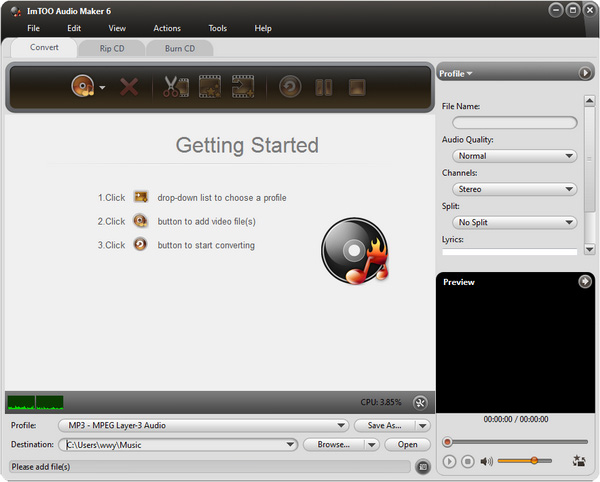
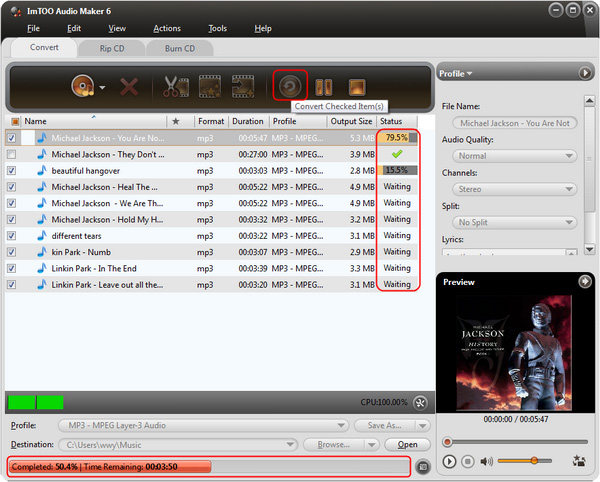
Step 1: Select Audio Converter function by clicking "Convert" tab.
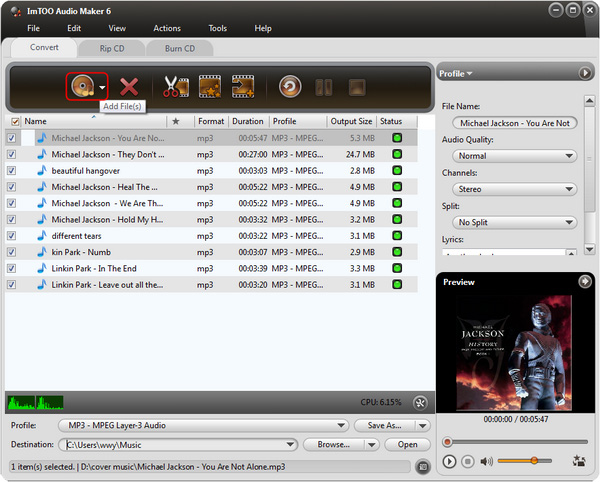
Step 2: Add Files by clicking "Add" button on the main interface or select "Add File… in the "File" menu.
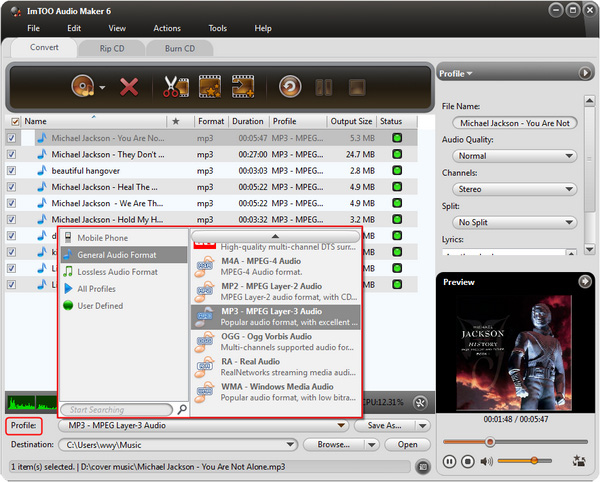
Step 3: Output settings.
Specify the target file format you want to convert. Highlight one or several files you loaded first and then select output profile from "Profile" combo-box.
Set output mode: After selecting certain output format, the right panel will show general standard of the format, such as: Bit rate, sample rate, codec, etc. By clicking certain setting, you may specify it , or just keep the default settings.
To set the folder that you want to save your target files, you may select the output folder by clicking "Browse…" button or directly enter a path in the "Destination" box. "C:temp" is set as the default destination folder.
Step 4:: Just click "Convert" button to start your conversion. You can see "Completed" under the "Status" column which means you got a successful conversion.
Glossary:
WAV:
WAV format is the standard Windows audio file format and it was originally to jointly developed by Microsoft and
IBM.
WMA:
WMA stands for Windows Media Audio. A proprietary audio format owned by Microsoft, part of Microsoft's
Windows Media technology.
M4A:
An MPEG-4 container format for audio files (compare to .mp4). The audio data within the container file can be
encoded with virtually any audio-encoding mechanism, but most commonly the .m4a refers to an audio file stored
within MPEG-4 container encoded with AAC audio format.
MP3:
MP3 stands for MPEG-1 Audio Layer III. It is not a separate format, but a part of MPEG-1 video encoding format,
developed by MPEG group in early 1990's. Too often people refer MP3 as MPEG-3, which is incorrect, because
such format doesn't even exist.