


ImTOO iPad PDF Transfer for Mac

Update: Nov 23, 2023
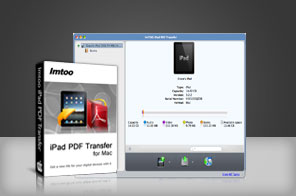


- Transfer PDF and EPUB eBooks from Mac to iPad.
- Copy PDF and EPUB eBooks from iPad to Mac.
- Backup PDF and EPUB eBooks in iPad to iTunes.
- Support multiple iPad/iPod touch/iPhone.
- Super high transferring speed.

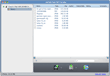
Facilitate for eBook readers on iPad, ImTOO iPad PDF Transfer for Mac is designed to help you transfer eBooks in PDF and EPUB formats to iPad/iPod touch/iPhone fast and straightforwardly. This PDF to iPad Transfer for Mac also enables you to transfer PDF and EPUB eBooks from iPad/iPod touch/iPhone to Mac, copy all eBooks in iPad/iPod touch/iPhone to iTunes.
Besides, ImTOO iPad PDF Transfer for Mac also qualifies you to edit PDF and EPUB eBook information such as name, author and rate or comment on them. A large range of iPad/iPod touch/iPhone devices are supported, such as iPad, iPad 2, iPad 3, iPad 4, iPad mini, iPad mini 2, iPad mini 3, iPad mini 4, iPad Air, iPad Air 2, iPad Pro, iPod, nano (5th Gen), iPod mini, iPod shuffle, iPod classic, iPod touch, iPod touch 4, iPod touch 5, iPod touch 6, iPhone, iPhone 3G, iPhone 3GS, iPhone 4, CDMA iPhone 4, iPhone 5, iPhone 5S, iPhone 5C, iPhone 6, iPhone 6 Plus, iPhone 6S, iPhone 6S Plus. Batch tasks can be transferred simultaneously.

Main Functions
 Transfer PDF and EPUB eBooks from iPad to Mac
Capable of transferring eBooks in PDF and EPUB format from iPad to Mac as backup straightforwardly without iTunes. Copy PDF and EPUB eBooks from Mac to iPad
Move eBooks in formats of PDF and EPUB on your Mac to iPad with fastest speed and high efficiency. Back up iPad Files into iTunes
Compatible with iTunes, you can also backup PDF and EPUB eBooks in your iPad to iTunes. iTunes 9.2 or above is supported. Support Most iPad/iPod touch/iPhone
Compatible with most iPad/iPod touch/iPhone versions, including iPad, iPad mini, iPad Air, iPad Pro (12.9/9.7/10.5/11 inch), iPod nano/mini/shuffle/classic/touch, iPhone 3G/3GS/4/5/5S/5C/SE/6/6S/7/8/X/XS/XR/11/12/13/14/15 Series.
What's new
- Fully compatible with iOS 17, iPhone 15, iPhone 15 Plus, iPhone 15 Pro, iPhone 15 Pro Max
- Fully support iPhone 6, iPhone 6 Plus
- Fully compatible with iOS 7, iPhone 5s, iPhone 5c, iPad Air
- Fully support iOS 6, iTunes 10.7, iPhone 5, iPad 4 and iPad mini
- Support iOS 4.3, iOS 5.1
- Support iPhone 4, iPhone 4S
Key Features
- Edit name and author of PDF and EPUB eBooks to personalize them. You can also rate or make comments on these eBooks.
- Search wanted eBooks with ease with file filter in the category of file name, size, type or author.
- Recognize connected devices and display detailed information of them, such as name, mode, capacity (occupied and left), version, serial number and etc.
- Impressive high-speed in transferring files between iPad/iPod touch/iPhone, Mac and iTunes brings the best performance. Batch transferring is also supported to enhance the performance of the application.
- Multi-lingual interface is available in language of English, French, Italian, Spanish, German, Japanese, Simplified or Traditional Chinese.
User Reviews
This is a really good, fast eBooks transfer and backup software for iPad users that quickly transfer PDF and EPUB eBooks to my new iPad. I recommend the ImTOO iPad PDF Transfer for Mac all the way! Ivan, US


-
- iTransfer Platinum Mac

- iPhone Transfer Platinum Mac
- iPad Mate Platinum Mac

- PodWorks Platinum Mac
- iPhone Ringtone Maker Mac
- iPhone Transfer Plus Mac
- iPad Mate for Mac
- PodWorks for Mac
- iPhone Contacts Transfer Mac
- DVD to Video for Mac
- DVD to MP4 Converter for Mac
- DVD to iPhone Converter for Mac
- Blu-ray to Video Converter for Mac
- DVD to iPad Converter for Mac
- DVD to Audio Converter for Mac
- DVD Creator for Mac
- Video Converter for Mac
- MP4 Converter for Mac
- 3D Movie Converter Mac
- Video Editor 2 for Mac
- Audio Converter Pro Mac
- YouTube Video Converter for Mac
- Download YouTube Video for Mac
- YouTube HD Video Downloader Mac
- YouTube to iTunes Converter Mac

- YouTube to iPhone Converter Mac
- HEVC/H.265 Converter for Mac
- iTransfer Platinum Mac
- More