


ImTOO iPad PDF Transfer

Update: Nov 23, 2023
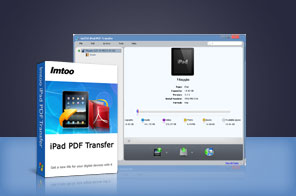


- Transfer PDF eBooks to iPad without iTunes as perfect PDF to iPad Transfer.
- Backup iPad PDF files to computer and iTunes.
- Also transfer EPUB eBooks between iPad and computer, from iPad to iTunes.
- Support multiple iPad/iPhone/iPod touch.
- Super high-speed in transferring files.


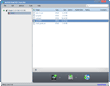
Designed for eBook fanciers on iPad, ImTOO iPad PDF Transfer offers a perfect solution to transfer eBooks in PDF and EPUB formats to iPad fast and straightforwardly. With this smart PDF to iPad transfer, you are enabled to transfer PDF and EPUB eBooks between iPad and PC or backup all eBooks in iPad to iTunes.
Besides PDF and EPUB transfer, ImTOO iPad PDF Transfer also allows you to edit information of PDF and EPUB files to your preference, such as name, author, rate, comments and so on. A large range of iPad/iPod touch/iPhone devices are supported, such as iPad, iPad 2, iPad 3, iPad 4, iPad mini, iPad mini 2, iPad mini 3, iPad mini 4, iPad Air, iPad Air 2, iPad Pro, iPod, nano (5th Gen), iPod mini, iPod shuffle, iPod classic, iPod touch, iPod touch 4, iPod touch 5, iPod touch 6, iPhone, iPhone 3G, iPhone 3GS, iPhone 4, CDMA iPhone 4, iPhone 5, iPhone 5S, iPhone 5C, iPhone 6, iPhone 6 Plus, iPhone 6S, iPhone 6S Plus. Simplest one step to complete file transferring: just drag files to the application!
Main Functions
 Transfer iPad PDF and EPUB to Computer
Back up PDF and EPUB files from iPad to PC as in a straightforward way without iTunes. Transfer PDF and EPUB to iPad
Copy eBooks in formats of PDF and EPUB on your local computer to iPad with high-efficiency. Back up iPad PDF and EPUB to iTunes
Compatible with iTunes, you can also backup PDF and EPUB files in your iPad to iTunes. iTunes 12 is supported. Support Many Types of iPad/iPod touch/iPhone
Super compatibility with many types of iPad/iPod touch/iPhone, including iPad, iPad mini, iPad Air, iPad Pro (12.9/9.7/10.5/11 inch), iPod nano/mini/shuffle/classic/touch, iPhone 3G/3GS/4/5/5S/5C/SE/6/6S/7/8/X/XS/XR/11/12/13/14/15 Series. High Transferring Speed
Impressive high-speed in transferring PDF and EPUB files between iPad/iPod touch/iPhone, PC and iTunes brings the best performance.
What's new
- Fully compatible with iOS 17, iPhone 15, iPhone 15 Plus, iPhone 15 Pro, iPhone 15 Pro Max
- Fully support iPhone 6, iPhone 6 Plus.
- Fully compatible with iOS 7, iPhone 5s, iPhone 5c, iPad Air
- Fully support iOS 6, iTunes 10.7, iPhone 5, iPad 4 and iPad mini
- Support iOS 4.3, iOS 5.1
- Support CDMA iPhone 4, iPhone 4S
Key Features
- Customize information of PDF and EPUB files by editing name and author.
- Add comments on PDF and EPUB files or rate files with up to 5 stars.
- File filter is provided to facilitate file searching by entering file name, size, type or author in searching box.
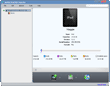
- Show all detailed information of connected devices, like name, mode, capacity (occupied and left), version, serial number and etc.
- Support batch file transferring at the same time to save much effort on repeated operations.
- Simplest way to complete file transferring only by single step: drag and drop files to the application.
- Activate post-task actions to auto-exit the application, shut down, hibernate, stand by the computer or do nothing after transferring is done.
- Multi-lingual interface is available in language of English, French, Italian, Spanish, German, Japanese, Simplified or Traditional Chinese.
User Reviews
"I’ve been using ImTOO software since 2006(I got my first iPod) and they have always had outstanding applications and customer service. This PDF to iPad transfer is one of the iPad tools I love. It’s very useful."Martin, US


-
- iTransfer Platinum Mac

- iPhone Transfer Platinum Mac
- iPad Mate Platinum Mac

- PodWorks Platinum Mac
- iPhone Ringtone Maker Mac
- iPhone Transfer Plus Mac
- iPad Mate for Mac
- PodWorks for Mac
- iPhone Contacts Transfer Mac
- DVD to Video for Mac
- DVD to MP4 Converter for Mac
- DVD to iPhone Converter for Mac
- Blu-ray to Video Converter for Mac
- DVD to iPad Converter for Mac
- DVD to Audio Converter for Mac
- DVD Creator for Mac
- Video Converter for Mac
- MP4 Converter for Mac
- 3D Movie Converter Mac
- Video Editor 2 for Mac
- Audio Converter Pro Mac
- YouTube Video Converter for Mac
- Download YouTube Video for Mac
- YouTube HD Video Downloader Mac
- YouTube to iTunes Converter Mac

- YouTube to iPhone Converter Mac
- HEVC/H.265 Converter for Mac
- iTransfer Platinum Mac
- More