


ImTOO ISO Burner

Update: Nov 16, 2021
ImTOO ISO Burner is an easy-to-use DVD ISO burner software. With it, you can burn ISO image file to DVD or CD disc easily. It can also help you burn DVD disc from other image files including BIN/CUE, IMG, MDF, NRG, CDI, B5i, B6i, DMG.
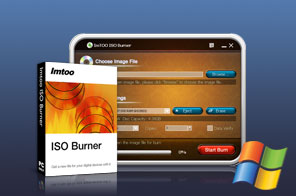


- ImTOO ISO Burner can burn not only ISO file to DVD, but also other image files like BIN/CUE, IMG, MDF, NRG, CDI, B5i, B6i, and DMG.
- With fast writing speed, the CD/DVD ISO burner has the ability to burn image file to most popular CD/DVD disc types including CD-R, CD-RW, DVD-R, DVD+R, DVD-RW, DVD+RW and DVD+R DL.
- ImTOO ISO Burner provides you with more options like erasing rewritable disc, selecting writing speed, and verifying written data to make perfect burning process.
Main Functions
 Burn ISO to DVD, CD
Burn ISO image file to DVDs/CDs and burn BIN/CUE, IMG, MDF, NRG, CDI, B5i, B6i, and DMG image file to DVDs/CDs. Type of ISO Image File
Support several source image files including data CD/DVD image, bootable CD/DVD image, media CD/DVD image. Support Kinds of Discs
Burn ISO and other image files to those CDs/DVDs: CD-R, CD-RW, DVD-R, DVD+R, DVD-RW, DVD+RW and DVD+R DL.
What's new
- Now support burning CD disc from CUE/BIN, CUE/FLAC, CUE/APE and CUE/WAV files.
- Prompt for errors in CUE file, and automatically correct the relevant BIN/FLAC/APE/WAV file names specified in CUE file.
Key Features
- Provide you with maximum writing speed that the target disc and recorder can support.
- Verify written data after the DVD ISO burning process to ensure the usability of the disc content.
- Help you erase the content of rewritable disc if necessary when burning CD/DVD.
- Provide selectable writing speed and support burning one source to several copies (up to 100 disc copies).
- Auto process one of after-done actions: shutdown, exit, hibernate or standby after burning done.
- The burning process bar will clearly show process details like the elapsed time and time remaining.
- Provide multi-language interfaces, that is, English, German, Japanese and Chinese.

User Reviews
"I purchase you ISO burner program and I am amazed with your program. I was able to burn the tons of ISO files on my computer to the DVD disc in just a few minutes. I was also amazed how fast and easy it was to use." Brynley Edens, Australia "ImTOO ISO Burner is quite easy to use ISO to DVD burning software! Not only ISO image it supports, but also IMG, MDF, and NRG. And the writing speed is awesome. I really hope it can support UDF image format!! If so, it will be perfect!!!"Michael Harron, Canada


-
- iTransfer Platinum Mac

- iPhone Transfer Platinum Mac
- iPad Mate Platinum Mac

- PodWorks Platinum Mac
- iPhone Ringtone Maker Mac
- iPhone Transfer Plus Mac
- iPad Mate for Mac
- PodWorks for Mac
- iPhone Contacts Transfer Mac
- DVD to Video for Mac
- DVD to MP4 Converter for Mac
- DVD to iPhone Converter for Mac
- Blu-ray to Video Converter for Mac
- DVD to iPad Converter for Mac
- DVD to Audio Converter for Mac
- DVD Creator for Mac
- Video Converter for Mac
- MP4 Converter for Mac
- 3D Movie Converter Mac
- Video Editor 2 for Mac
- Audio Converter Pro Mac
- YouTube Video Converter for Mac
- Download YouTube Video for Mac
- YouTube HD Video Downloader Mac
- YouTube to iTunes Converter Mac

- YouTube to iPhone Converter Mac
- HEVC/H.265 Converter for Mac
- iTransfer Platinum Mac
- More